
Use this node from the SDK
Add it in Python with
pipeline.add(name="...").llm(...). See the SDK reference.Core Functionality
- Generate text responses with built-in real-time web search capabilities
- Access Perplexity Sonar models optimized for research and reasoning
- Process system instructions and dynamic prompts with variable interpolation
- Stream responses in real time for long-running generations
- Track token usage and credit consumption per run
- Apply content moderation, PII detection, and safety guardrails
- Retry failed executions automatically with configurable intervals
Tool Inputs
System Instructions— (String) Instructions that guide the model’s behavior, tone, and how it should use data provided in the promptPrompt— (String) The data sent to the model. Type{{to open the variable builder and reference outputs from other nodesModel* — (Enum (Dropdown), default:sonar-reasoning-pro) Select from available Perplexity modelsUse Personal Api Key— (Boolean, default:No) Toggle to use your own Perplexity API keyApi Key— (String) Your Perplexity API key. Only visible whenUse Personal Api Keyis enabled
Tool Outputs
response— (String (or Stream<String> when streaming)) The generated text response from the modelprompt_response— (String) The combined prompt and response contenttokens_used— (Integer) Total number of tokens consumed (input + output)input_tokens— (Integer) Number of input tokens sent to the modeloutput_tokens— (Integer) Number of output tokens generated by the modelcredits_used— (Decimal) VectorShift AI credits consumed for this run
- Workflows
Overview
The Perplexity LLM node in workflows provides access to Sonar models that can search the web in real time as part of their response generation. Unlike standard LLMs that rely only on training data, Perplexity models actively retrieve current information, making them ideal for time-sensitive financial research and monitoring.Use Cases
- Real-time market research — Query current stock prices, recent earnings announcements, or breaking financial news with responses grounded in live web data.
- Competitor monitoring — Track recent competitor product launches, pricing changes, or partnership announcements across the web.
- Regulatory update tracking — Monitor recent regulatory changes, SEC filings, or compliance guidance updates in real time.
- Due diligence research — Research target companies using current web sources, including recent news, press releases, and financial coverage.
- Market sentiment analysis — Analyze current market sentiment by searching and synthesizing recent financial commentary and analyst opinions.
How It Works
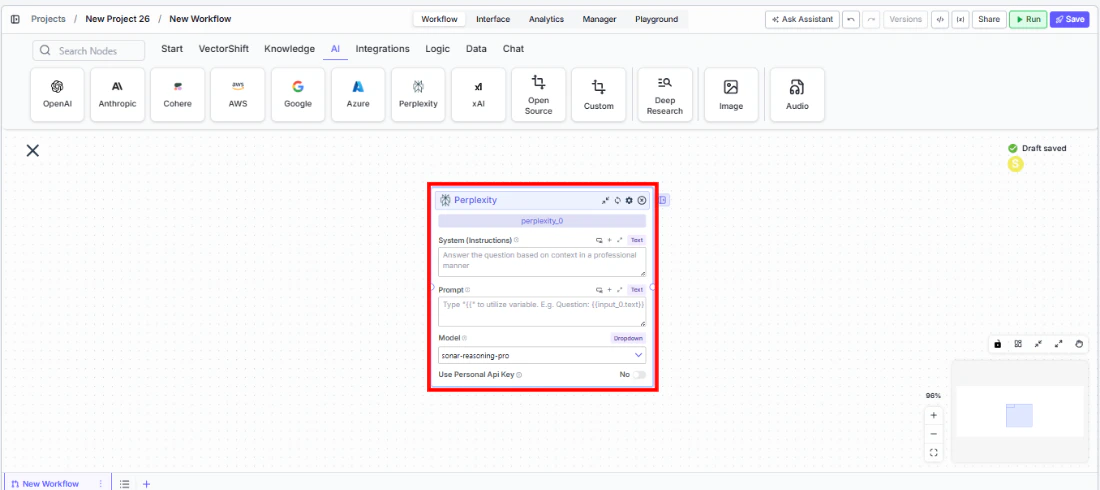
- Add the node to your workflow. From the toolbar, open the AI category and drag the Perplexity node onto the canvas.
-
Write your System Instructions. Enter instructions in the
System Instructionsfield to guide the model’s response behavior. -
Configure the Prompt. In the
Promptfield, type{{to reference upstream node outputs. -
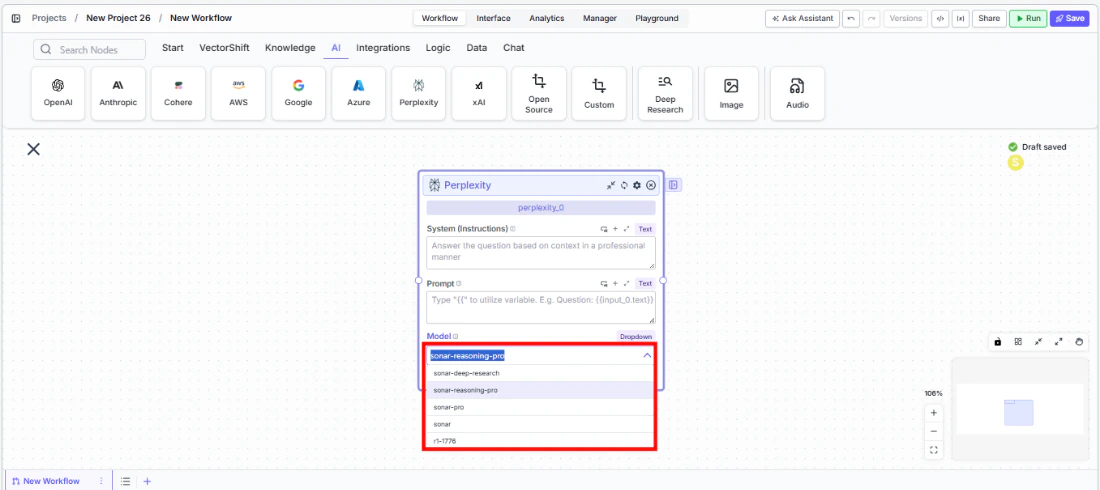
Select a model. Use the
Modeldropdown to choose a Perplexity model. The defaultsonar-reasoning-proprovides strong reasoning with web search.
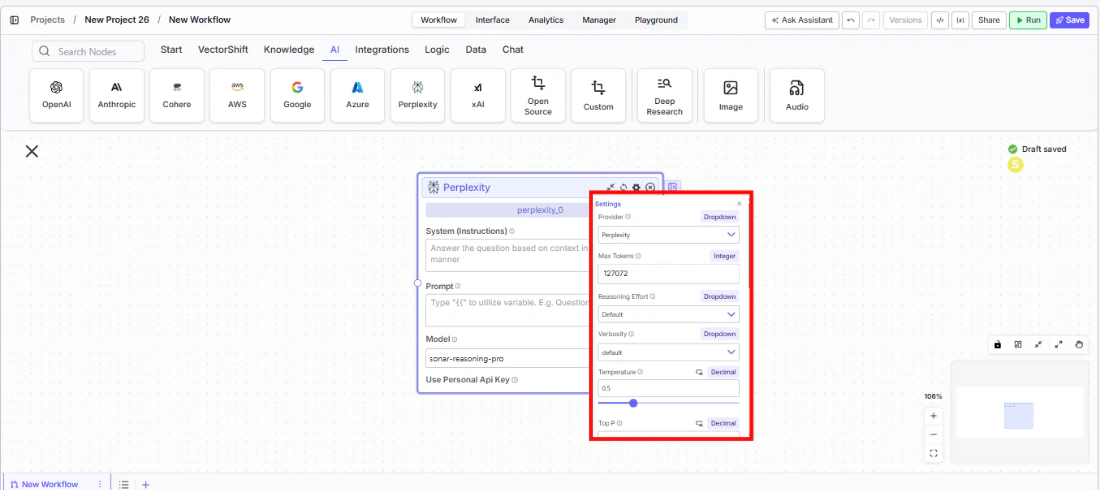
- Open settings. Click the gear icon (⚙) to configure settings.
- Connect outputs. Wire the
responseoutput to downstream nodes. The response includes information retrieved from the web.
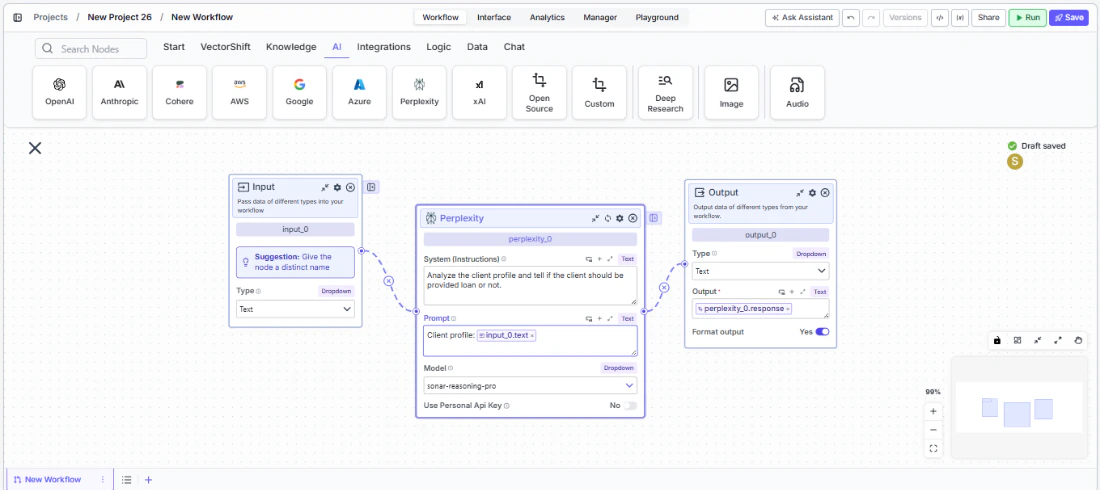
- Run your workflow. Execute the workflow to get responses grounded in current web data.
Settings
All settings below are accessed via the gear icon (⚙) on the node.Best Practices
- Use for time-sensitive queries. Perplexity excels when responses need current data — use it for market research, news monitoring, and regulatory tracking.
- Combine with static data sources. Feed knowledge base context through the prompt alongside Perplexity’s web search for comprehensive answers that blend internal and external data.
- Enable Show Sources. When grounding is important (e.g., compliance workflows), enable
Show Sourcesto trace where the model retrieved its information. - Monitor costs. Web-search-augmented models may consume more tokens. Track usage for budgeting.
- Apply PII detection. Enable relevant PII toggles when processing financial data through the model.
Related Templates
FX Arbitrage Research Agent
Identifies and analyzes foreign exchange arbitrage opportunities across markets and instruments.
Webpage Customer Support Agent
Provides real-time customer support directly embedded within a website interface.