
Use this node from the SDK
Add it in Python with
pipeline.add(name="...").llm(...). See the SDK reference.Core Functionality
- Generate text completions and conversational responses using Claude models
- Process system instructions and dynamic prompts with variable interpolation
- Stream responses in real time for long-running generations
- Return structured JSON output with optional schema enforcement
- Track token usage and credit consumption per run
- Apply content moderation, PII detection, and safety guardrails
- Retry failed executions automatically with configurable intervals
Tool Inputs
System Instructions— (String) Instructions that guide the model’s behavior, tone, and how it should use data provided in the promptPrompt— (String) The data sent to the model. Type{{to open the variable builder and reference outputs from other nodesModel* — (Enum (Dropdown), default:claude-sonnet-4-6) Select from available Claude models. Click Dropdown to view all optionsUse Personal Api Key— (Boolean, default:No) Toggle to use your own Anthropic API key instead of VectorShift’s shared keyApi Key— (String) Your Anthropic API key. Only visible whenUse Personal Api Keyis enabledJSON Schema— (String) JSON schema to enforce structured output format. Only visible whenJSON Responseis enabled in the settings panel
Tool Outputs
response— (String (or Stream<String> when streaming)) The generated text response from the modelprompt_response— (String) The combined prompt and response contenttokens_used— (Integer) Total number of tokens consumed (input + output)input_tokens— (Integer) Number of input tokens sent to the modeloutput_tokens— (Integer) Number of output tokens generated by the modelcredits_used— (Decimal) VectorShift AI credits consumed for this run
- Workflows
Overview
The Anthropic LLM node in workflows lets you place a Claude model directly on the canvas, wire inputs and outputs to other nodes, and configure model behavior through the settings panel. Responses can be streamed for real-time display or returned as a complete block for downstream processing.Use Cases
- Earnings call analysis — Summarize quarterly earnings transcripts and extract key financial metrics like revenue, EPS, and guidance changes for analyst review.
- Regulatory document review — Parse SEC filings or compliance documents, flagging sections that require legal attention or contain material disclosures.
- Client communication drafting — Generate personalized portfolio update emails by combining market data with client-specific holdings and risk profiles.
- Financial data extraction — Pull structured data from unstructured documents using JSON mode — extract line items from invoices or expense reports into a consistent schema.
- Risk assessment narratives — Produce written risk summaries by combining quantitative model outputs with qualitative market context and historical patterns.
How It Works
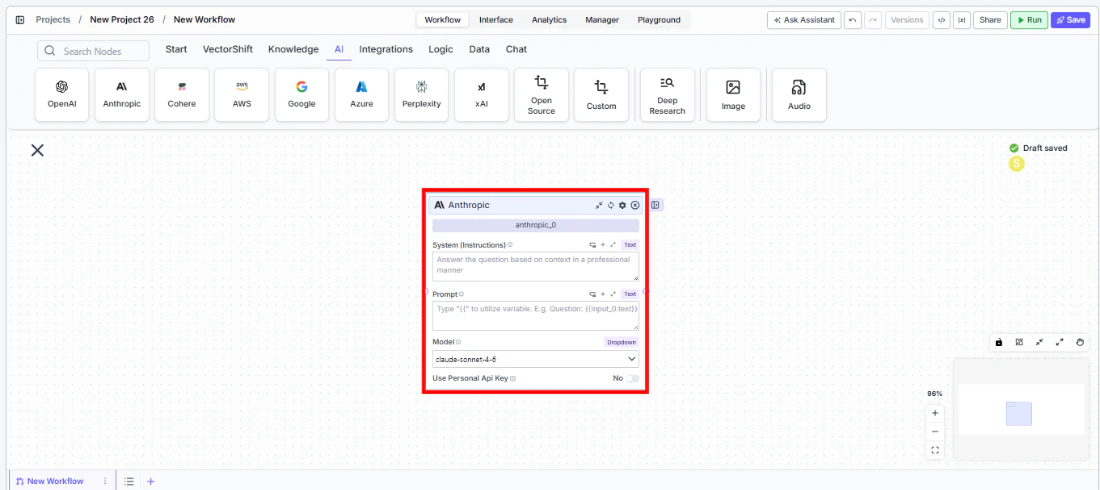
- Add the node to your workflow. From the toolbar, open the AI category and drag the Anthropic node onto the canvas.
-
Write your System Instructions. Enter instructions in the
System Instructionsfield to define the model’s behavior, tone, and how it should use any data provided in the prompt. For example: “Answer the question based on context in a professional manner.” -
Configure the Prompt. In the
Promptfield, type{{to open the variable builder and reference outputs from upstream nodes. For example:Question: {{input_0.text}} Context: {{knowledge_base_0.chunks}}. -
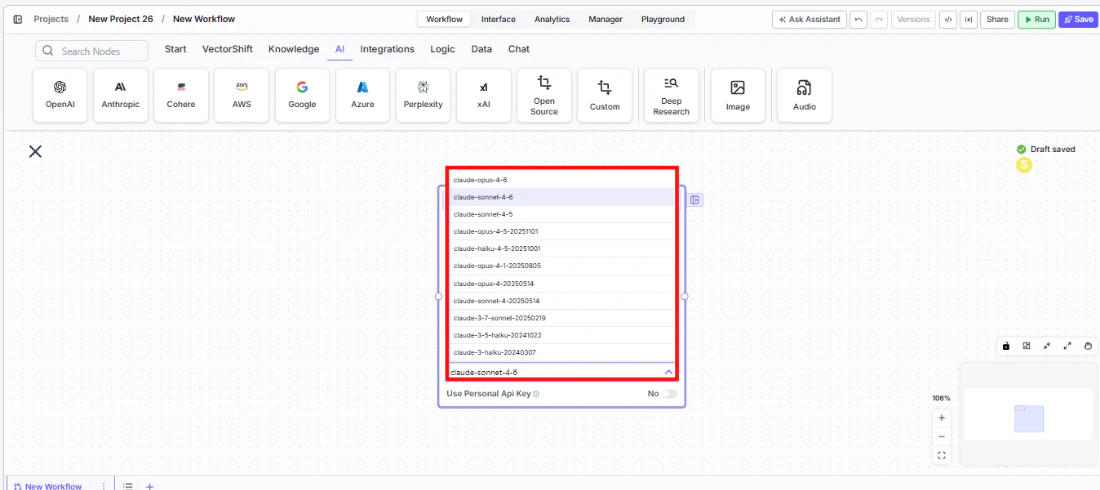
Select a model. Use the
Modeldropdown to choose a Claude model. Available options includeclaude-sonnet-4-6,claude-sonnet-4-5,claude-opus-4,claude-haiku-4-5,claude-3.7-sonnet,claude-3.5-haiku, and others.
-
Enable streaming (optional). Click the Streaming toggle on the node face to receive responses token-by-token. When streaming is enabled, the
responseoutput type changes toStream<String>— ensure any connected Output node is set to Streamed Text. -
Use a personal API key (optional). Toggle
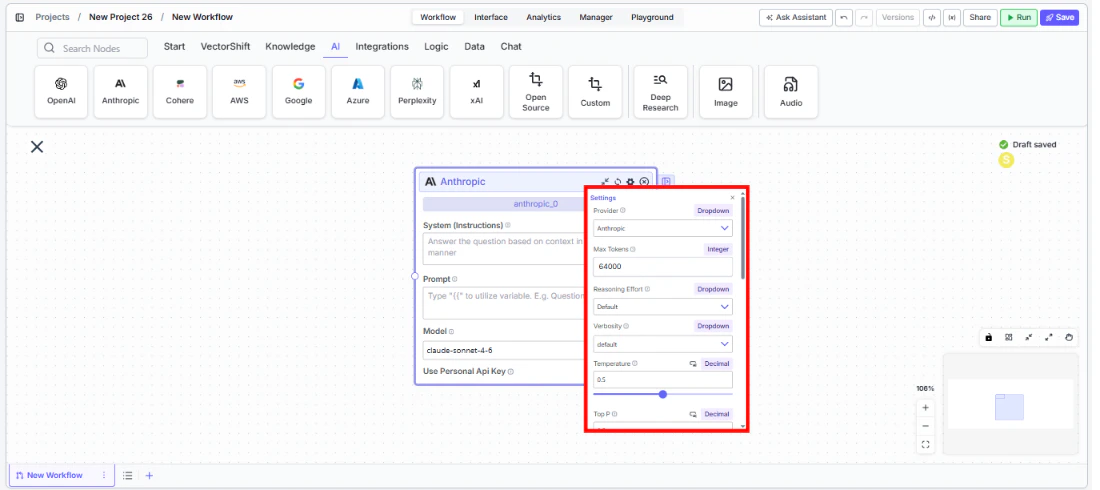
Use Personal Api Keyto Yes to use your own Anthropic API key. AnApi Keyfield appears below — paste your key there. - Open settings. Click the gear icon (⚙) on the node to open the settings panel, where you can configure token limits, temperature, retry behavior, safety features, and more.
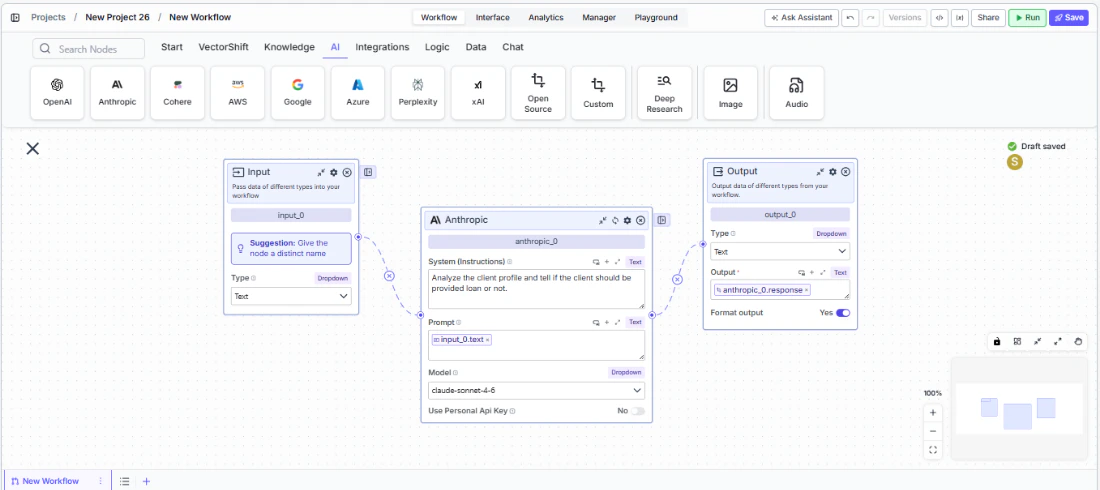
- Connect outputs. Click the Outputs button to open the outputs panel. Wire the
responseoutput to downstream nodes (e.g., an Output node, another LLM, or a Text node). Usetokens_used,input_tokens,output_tokens, andcredits_usedfor monitoring and cost tracking.
- Run your workflow. Execute the workflow. The Anthropic node processes its inputs and returns the generated response along with usage metrics.
Settings
All settings below are accessed via the gear icon (⚙) on the node.Best Practices
- Start with a specific system prompt. For financial workflows, include explicit instructions about the output format — e.g., “Respond with bullet points,” “Include only numerical data,” or “Cite the section of the filing.”
- Use JSON mode for structured extraction. When pulling financial metrics from documents, enable
JSON Responseand provide a schema to ensure consistent, machine-readable output across runs. - Monitor token usage. Connect
tokens_usedandcredits_usedoutputs to tracking nodes, especially important for high-volume batch processing of financial documents. - Enable Safe Context Token Window for variable-length inputs. When processing documents of unpredictable size (like earnings transcripts), this prevents token-limit errors by automatically truncating inputs.
- Use streaming for client-facing interfaces. If the Anthropic node powers a chatbot answering investor queries, enable streaming for a more responsive user experience.
- Apply PII detection for client data. When processing client communications or personal financial data, enable the relevant PII detection toggles to prevent sensitive information from being sent to the model.
Related Templates
Grant Matching AI Agent
Matches organizations or individuals to relevant grants based on their profile and eligibility criteria.
IC Memo Agent
Drafts and reviews investment committee memos using deal data and internal templates.