
Use this node from the SDK
Add it in Python with
pipeline.add(name="...").deep_research(...). See the SDK reference.Core Functionality
- Perform multi-step research using specialized deep research models with built-in web search
- Process research queries and custom instructions for targeted analysis
- Maintain conversation context across sequential research tasks
- Stream research output in real time for long-running analyses
- Track token usage and credit consumption per research run
- Return structured metadata including response IDs, timestamps, and error details
- Support multiple providers including OpenAI, Azure, Anthropic, and Google
Tool Inputs
Input— (String) The research query or data to analyze. Accepts free text or references to other node outputs via{{variable}}syntaxInstructions— (String) Specific instructions for the research task — use this to guide the model’s research focus, depth, and output formatModel* — (Enum (Dropdown), default:o3-deep-research) Select from available deep research models. Options vary by providerUse Personal Api Key— (Boolean, default:No) Toggle to use your own API key instead of VectorShift’s shared keyApi Key— (String) Your API key. Only visible whenUse Personal Api Keyis enabled
Tool Outputs
response— (String (or Stream<String> when streaming)) The research output and findingsconversation— (String) The updated conversation including the research response — useful for chaining sequential research tasksid— (String) The unique ID of the research responsecreated_at— (String) Timestamp when the research was completedincomplete_details— (String) Details about any incomplete aspects of the researcherror— (String) Error message if the research failedtokens_used— (Integer) Total number of tokens consumed during researchinput_tokens— (Integer) Number of input tokens usedoutput_tokens— (Integer) Number of output tokens generatedcredits_used— (Decimal) VectorShift AI credits consumed for this run
- Workflows
Overview
The Deep Research node in workflows lets you place a specialized research model on the canvas that can autonomously search the web, synthesize information from multiple sources, and produce comprehensive research reports. Unlike standard LLM nodes, this node is designed for complex, multi-step research tasks where the model needs to gather and analyze information before responding.Use Cases
- Investment due diligence — Research a target company’s financials, market position, competitive landscape, and regulatory history to produce a comprehensive due diligence report.
- Regulatory monitoring — Track and synthesize recent regulatory developments across jurisdictions — for example, summarizing new SEC guidance, EU MiFID updates, or APAC compliance changes.
- Market analysis reports — Generate detailed market analysis covering sector trends, key players, recent deals, and forward-looking indicators for portfolio strategy discussions.
- Competitive intelligence — Research competitor product launches, pricing changes, partnership announcements, and financial performance to inform strategic planning.
- Incident research — Investigate the background, timeline, and implications of market events (e.g., a flash crash, major earnings miss, or regulatory action) by synthesizing web sources.
- Thematic research — Explore emerging themes like AI in fintech, ESG scoring methodologies, or digital asset regulation by aggregating insights from multiple sources.
How It Works
- Add the node to your workflow. From the toolbar, open the AI category and drag the Deep Research node onto the canvas. It appears as “OpenAI Deep Research” by default.
-
Enter your research query. In the
Inputfield, enter the research question or topic. You can type directly or reference outputs from upstream nodes using{{variable}}syntax — for example,{{input_0.text}}. -
Provide research instructions (optional). In the
Instructionsfield, specify how the model should conduct the research — for example, what sources to prioritize, what format to use for the output, or what aspects to focus on. -
Select a model. Use the
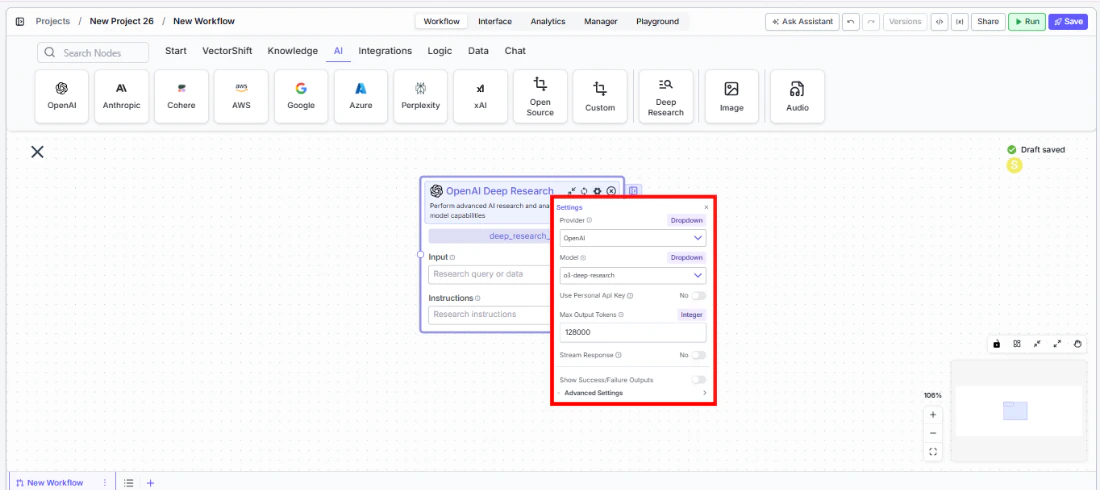
Modeldropdown to choose a deep research model. The default iso3-deep-research. Other available models includegpt-5,gpt-5-mini,gpt-5-nano,gpt-4.5,gpt-4.1, and variants. - Open settings. Click the gear icon (⚙) to open the settings panel. Here you can change the provider, configure token limits, enable streaming.
- Connect outputs. Click the Outputs button to open the outputs panel. Wire the
responseoutput to downstream nodes for the research findings. Useconversationto chain sequential research tasks. Monitor costs withtokens_usedandcredits_used.
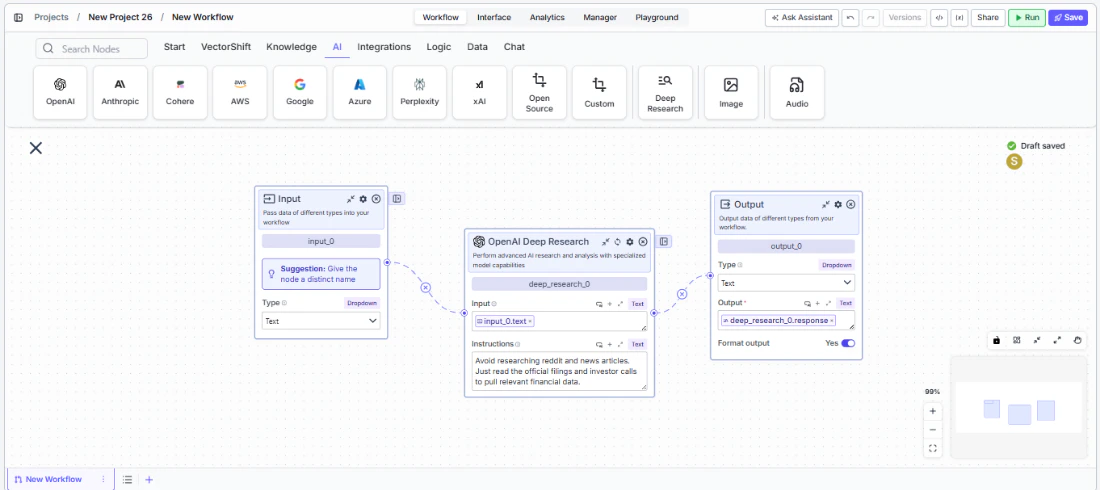
- Run your workflow. Execute the workflow. The Deep Research node processes the query, conducts web-based research, and returns comprehensive findings along with metadata and usage metrics.
Settings
Settings are accessed via the gear icon (⚙) on the node.Best Practices
- Write specific research instructions. The more targeted your
Instructionsfield, the more relevant the research output. Instead of “Research Company X,” try “Research Company X’s Q4 2025 earnings, focusing on revenue growth, margin trends, and management guidance for 2026.” - Chain research tasks with conversation output. Wire the
conversationoutput of one Deep Research node into the input of another to build cumulative research across multiple steps — useful for multi-phase due diligence workflows. - Monitor token usage carefully. Deep research tasks can consume significantly more tokens than standard LLM calls due to multi-step reasoning and web search. Connect
tokens_usedandcredits_usedto monitoring nodes. - Use the error and incomplete_details outputs. Wire these outputs to conditional logic nodes to handle cases where research is incomplete or encounters errors — important for production workflows that need reliability.
- Select the right model for the task. Use
o3-deep-researchfor comprehensive research tasks. For faster, lighter research, considergpt-5-miniorgpt-4.1variants when available through your provider. - Enable streaming for long research tasks. Deep research can take longer than standard LLM calls. Enable streaming so users see incremental progress rather than waiting for the full result.
Related Templates
FX Arbitrage Research Agent
Identifies and analyzes foreign exchange arbitrage opportunities across markets and instruments.
Earnings Call Insight and Sentiment Analyzer
Analyzes earnings call transcripts for sentiment, key themes, and forward-looking signals.
Grant Matching AI Agent
Matches organizations or individuals to relevant grants based on their profile and eligibility criteria.
Investment Memo Generator
Automatically generates structured investment memos from deal data and research inputs.