
Use this node from the SDK
Add it in Python with
pipeline.add(name="...").llm(...). See the SDK reference.Core Functionality
- Access open-source models from Meta Llama, Mistral, Google Gemma, DeepSeek, and others via Together AI
- Process system instructions and dynamic prompts with variable interpolation
- Stream responses in real time for long-running generations
- Return structured JSON output with optional schema enforcement
- Track token usage and credit consumption per run
- Apply content moderation, PII detection, and safety guardrails
- Retry failed executions automatically with configurable intervals
Tool Inputs
System Instructions— (String) Instructions that guide the model’s behavior, tone, and how it should use data provided in the promptPrompt— (String) The data sent to the model. Type{{to open the variable builder and reference outputs from other nodesModel* — (Enum (Dropdown), default:deepseek-ai/DeepSeek-R1) Select from available open-source models. Click Dropdown to view all optionsUse Personal Api Key— (Boolean, default:No) Toggle to use your own Together AI API keyApi Key— (String) Your Together AI API key. Required whenUse Personal Api Keyis enabled — the node will show a validation error if left blankJSON Schema— (String) JSON schema to enforce structured output. Only visible whenJSON Responseis enabled
Tool Outputs
response— (String (or Stream<String> when streaming)) The generated text response from the modelprompt_response— (String) The combined prompt and response contenttokens_used— (Integer) Total number of tokens consumed (input + output)input_tokens— (Integer) Number of input tokens sent to the modeloutput_tokens— (Integer) Number of output tokens generated by the modelcredits_used— (Decimal) VectorShift AI credits consumed for this run
- Workflows
Overview
The Open Source LLM node in workflows lets you place an open-source model on the canvas via Together AI’s hosting infrastructure. This gives you access to a wide range of models from different research labs, enabling cost optimization and model evaluation within your workflows.Use Cases
- Cost-optimized batch processing — Route high-volume, lower-complexity tasks like transaction tagging to cost-effective open-source models while reserving premium models for complex analysis.
- Model evaluation and comparison — Compare outputs across different open-source model families to find the best quality-to-cost ratio for specific financial tasks.
- Research summarization — Use DeepSeek or Llama models to summarize research papers, market reports, or regulatory updates at scale.
- Regulatory document classification — Classify documents by type, jurisdiction, or urgency using open-source models that perform well on categorization tasks.
- Internal knowledge Q&A — Build cost-effective internal chatbots using open-source models grounded in your organization’s documentation.
How It Works
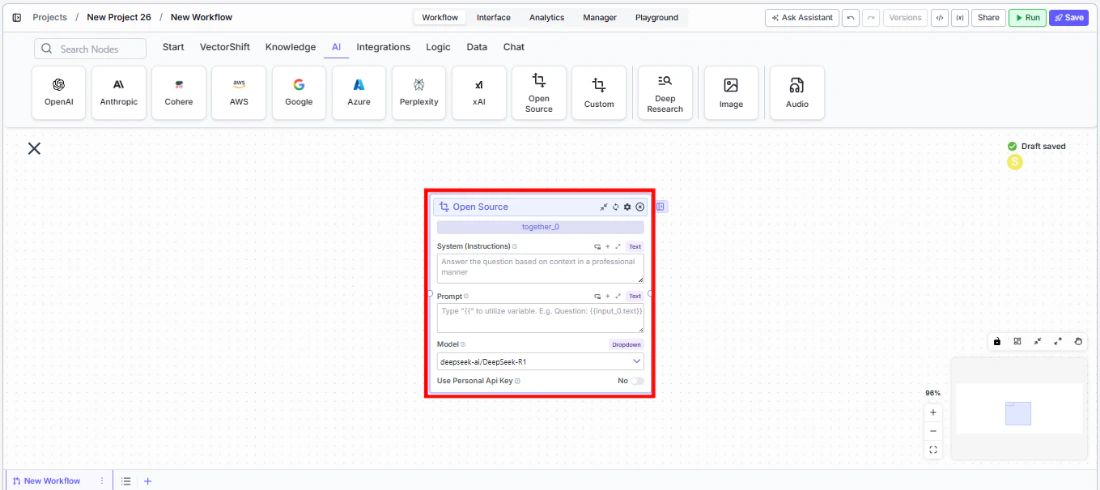
- Add the node to your workflow. From the toolbar, open the AI category and drag the Open Source node onto the canvas.
-
Write your System Instructions. Enter instructions in the
System Instructionsfield to define the model’s behavior. -
Configure the Prompt. In the
Promptfield, type{{to open the variable builder and reference upstream node outputs. -
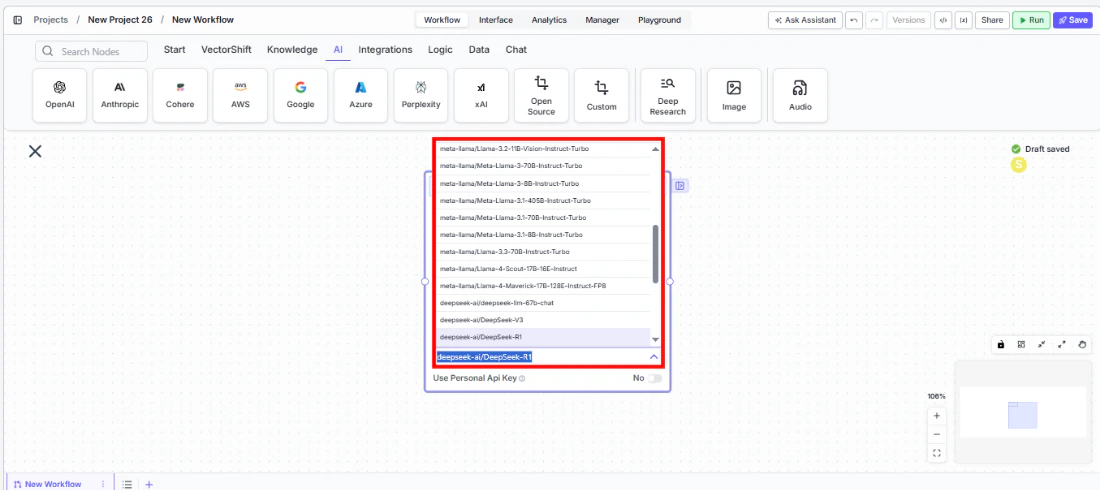
Select a model. Use the
Modeldropdown to choose an open-source model. Available options includedeepseek-ai/DeepSeek-R1,meta-llama/Llama-3-70b-chat-hf,mistralai/Mistral-7B-Instruct-v0.1,mistralai/Mixtral-8x7B-Instruct-v0.1,google/gemma-2-27b-it,nvidia/Llama-3.1-Nemotron-Ultra-253B-v1, and others.
-
Provide an API key. Toggle
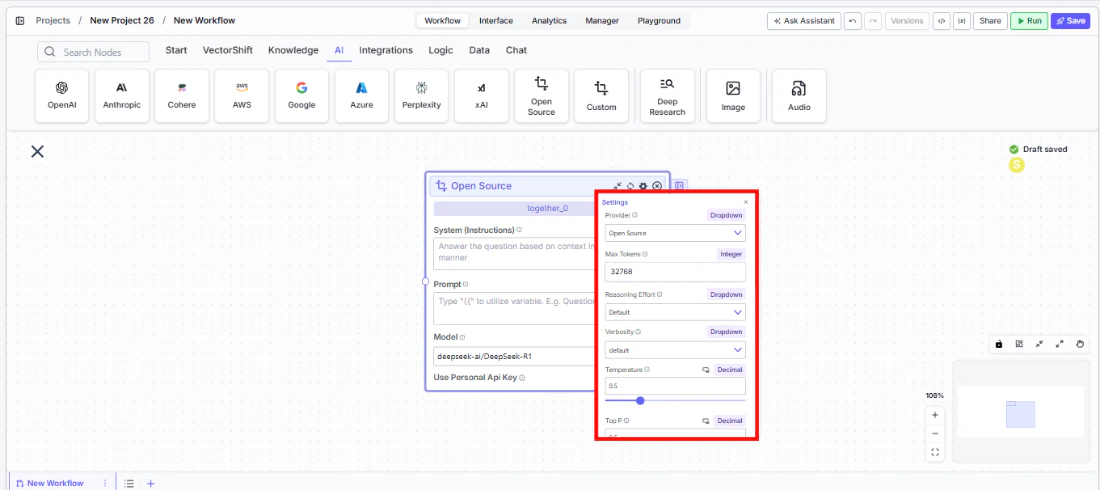
Use Personal Api Keyto Yes and enter your Together AI API key. - Open settings. Click the gear icon (⚙) to configure token limits, temperature, retry behavior, and more.
- Connect outputs and run. Wire the
responseoutput to downstream nodes and execute the workflow.
Settings
All settings below are accessed via the gear icon (⚙) on the node.Best Practices
- Start with DeepSeek-R1 for reasoning tasks. It offers strong reasoning capabilities at a lower cost than commercial alternatives.
- Use Llama models for general-purpose tasks. Meta’s Llama family provides excellent general performance for summarization and Q&A.
- Compare models before committing. Swap the model dropdown to test different models on the same inputs and evaluate quality-to-cost tradeoffs.
- Monitor token usage. Open-source models via Together AI are billed per token — track consumption for budgeting.
- Enable PII detection for client data. Even with open-source models, apply PII toggles when processing sensitive financial information.