Use this node from the SDK
Add it in Python with
pipeline.add(name="...").knowledge_base_agent(...). See the SDK reference.Core Functionality
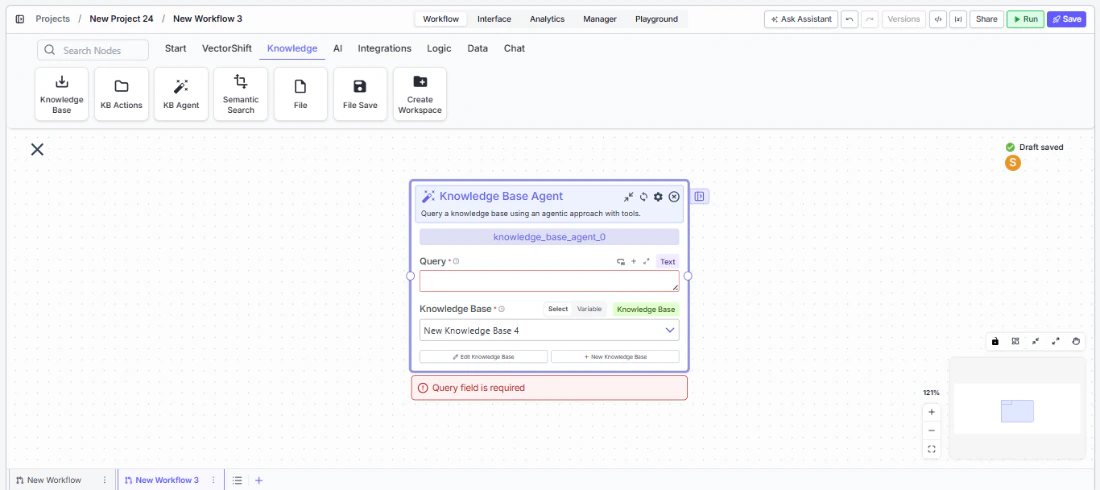
- Query a knowledge base using an AI agent that reasons about the best retrieval approach
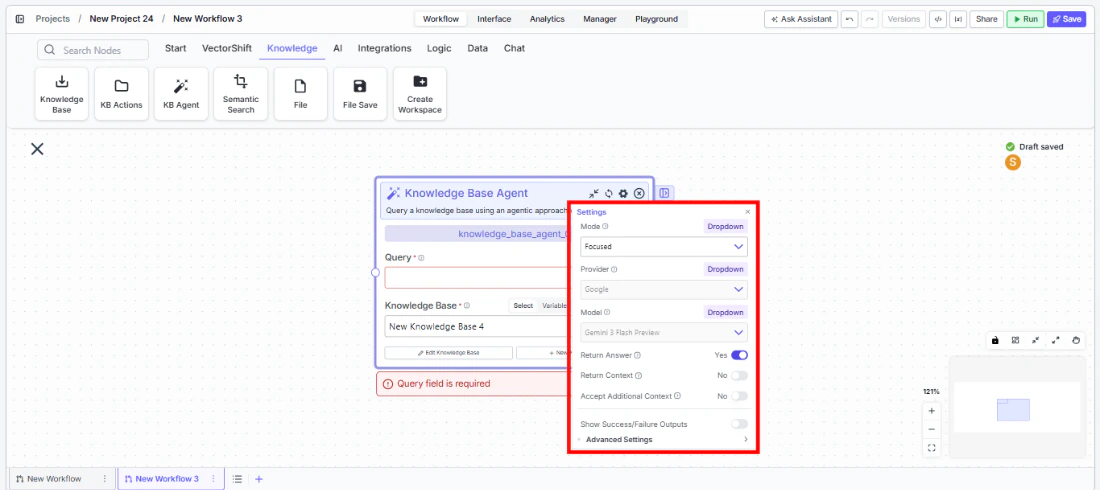
- Choose between Fast, Focused, and Deep query modes to balance speed and thoroughness
- Optionally return the source context and chunks used to generate the answer
- Accept additional context (e.g., conversation history) to improve query relevance
- Select the LLM provider and model powering the agent’s reasoning
Tool Inputs
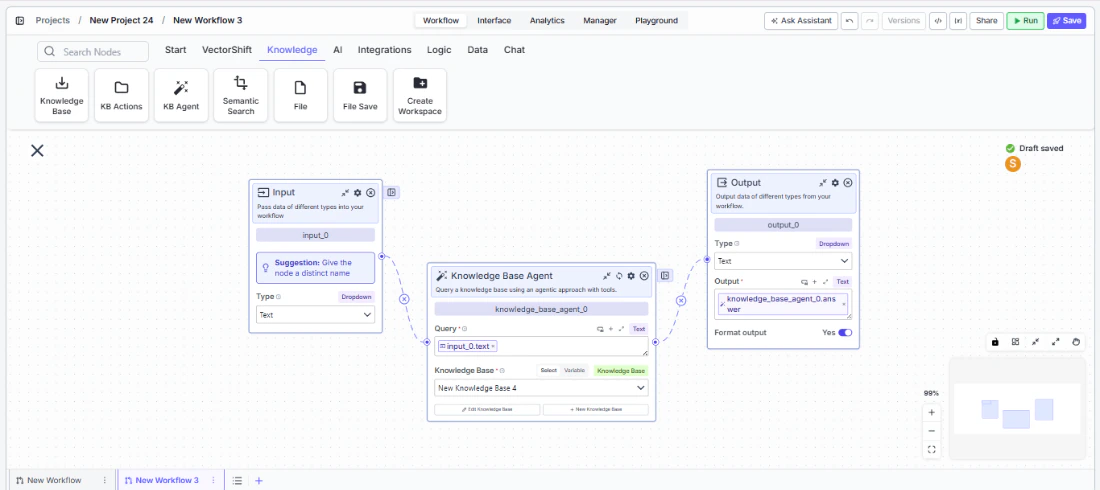
Knowledge Base* — Required · Knowledge Base selector · The knowledge base to query.Query* — Required · Text · The natural language query. The agent uses this to determine the best way to query the knowledge base. Include the key criteria needed to answer the query.Mode— Dropdown · Default:Focused· Options:Fast,Focused,Deep· Controls the query effort — Fast for quick answers, Focused for balanced depth, Deep for thorough analysis.Return Answer— Boolean · Default:true· When enabled, generates a synthesized answer from the knowledge base.Return Context— Boolean · Default:false· When enabled, returns the relevant context and chunks used to generate the answer.Accept Additional Context— Boolean · Default:false· When enabled, shows an additional context input to provide supplementary information to the agent. (Advanced setting)Additional Context— Text · Optional · Additional context to help the agent understand the query better (e.g., conversation history, user preferences). Appears whenAccept Additional Contextis enabled.Provider— Dropdown · Default:Google· The LLM provider used by the agent. (Advanced setting)Model— Dropdown · Default:gemini-3-flash-preview· The LLM model used by the agent. (Advanced setting)
Tool Outputs
answer— Text · The answer synthesized by the agent from the knowledge base.context— Text · The formatted context and chunks used by the agent to generate the answer. Only present whenReturn Contextis enabled.
- Agents
- Workflows
Overview
When added as a tool inside an agent, the Knowledge Base Agent enables your primary agent to delegate complex knowledge base queries to a specialized retrieval agent. The primary agent passes the query, the retrieval agent reasons about the best search strategy, fetches relevant chunks, and returns a synthesized answer — all within the conversation flow.Use Cases
- Regulatory Q&A assistant — A client-facing agent delegates SEC filing questions to a Knowledge Base Agent tool connected to a regulatory document library, returning precise citations.
- Investment research copilot — An analyst agent queries a knowledge base of earnings transcripts and annual reports to answer specific questions about company performance.
- Policy lookup for advisors — A financial advisor agent uses a Knowledge Base Agent to retrieve and summarize relevant sections from internal compliance policies.
- Due diligence support — An M&A agent queries a knowledge base of target company documents to answer specific due diligence questions with sourced context.
- Client portfolio FAQ — A wealth management agent queries product knowledge bases to answer client questions about fund strategies, fees, and performance history.
How It Works
- Add the tool — In the agent builder, open the tool panel and navigate to the Knowledge category. Select Knowledge Base Agent to add it as a tool.
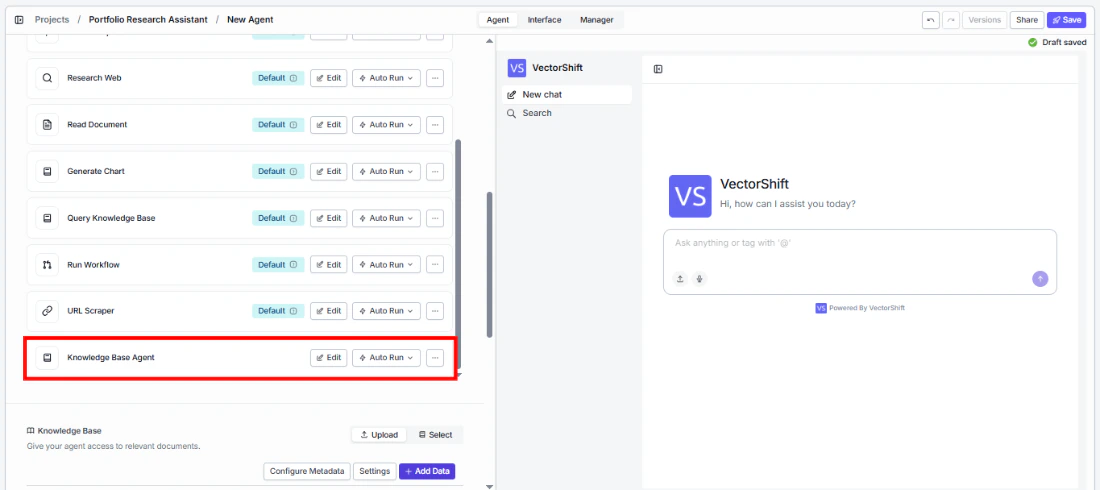
- Select the knowledge base — Use the
Knowledge Baseselector to choose which knowledge base the agent will query. - Configure input fields — The
Queryfield can be left open for the primary agent to fill dynamically based on conversation context, or locked to a fixed value for consistent queries. Click the sparkle icon to switch fields between dynamic and static mode.
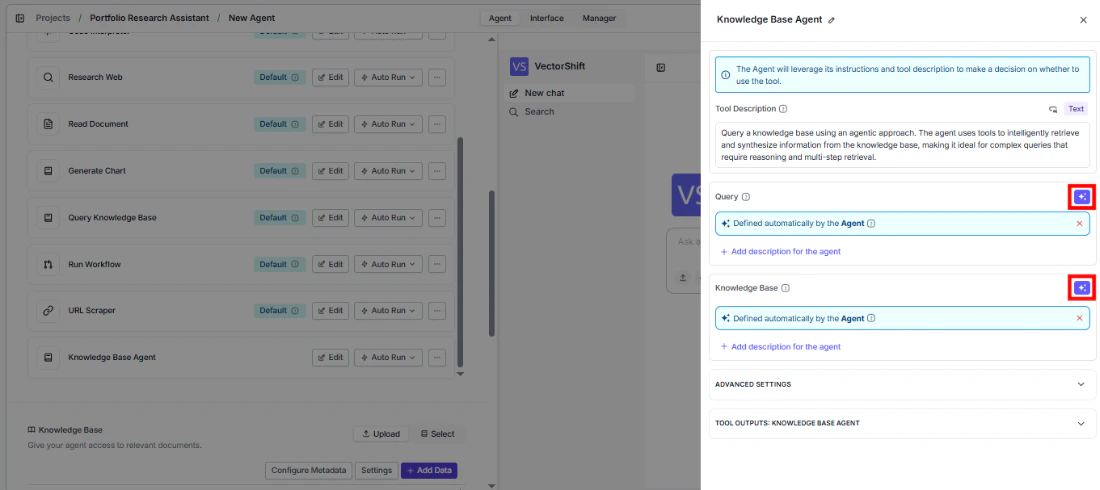
- Write a Tool Description — Describe when the agent should use this tool. Example: “Use this tool to answer questions about SEC regulatory filings. Provide a specific, detailed query including the regulation name or section number.”
- Set Auto Run behavior — Choose how the tool executes:
- Auto Run — Queries the knowledge base immediately.
- Require User Approval — Pauses for user confirmation before querying.
- Let Agent Decide — The agent determines whether approval is needed based on context.
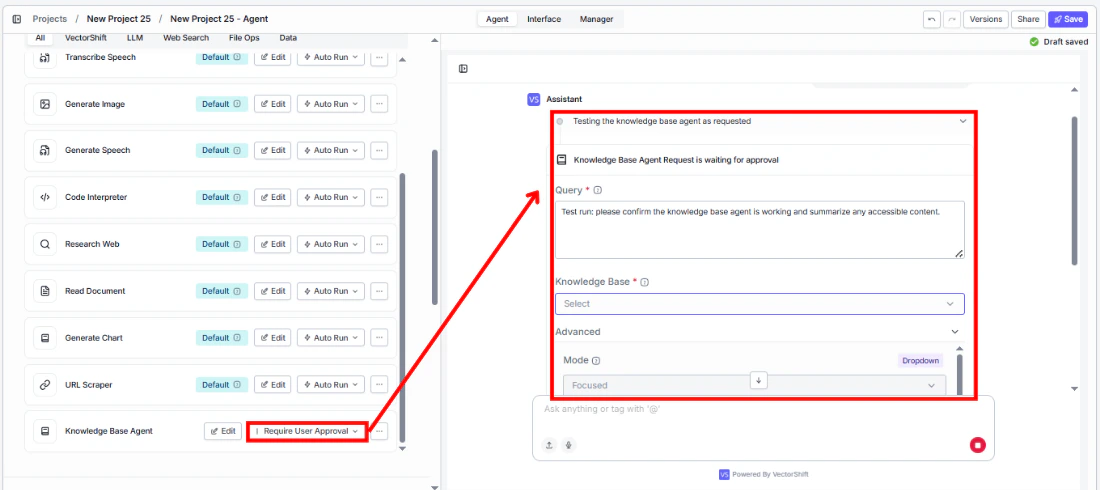
- Test the tool — Send a question in the chat interface that should trigger the knowledge base query and verify the agent returns a relevant, sourced answer.
Settings
Knowledge Base— Knowledge Base selector · Default: none · The knowledge base to query.Tool Description— Text · Default: none · Describes when and how the agent should use this tool.Auto Run— Dropdown · Default: Auto Run · Controls execution behavior.
Provider— Dropdown · Default:Google· LLM provider for the retrieval agent.Model— Dropdown · Default:gemini-3-flash-preview· LLM model for the retrieval agent.Mode— Dropdown · Default:Focused· Query depth (Fast, Focused, Deep).Return Context— Boolean · Default:false· Return source chunks alongside the answer.Accept Additional Context— Boolean · Default:false· Enable additional context input.
Best Practices
- Write specific queries — The more specific the query, the better the agent can target its retrieval. Include entity names, date ranges, and specific metrics rather than broad questions.
- Use Deep mode for complex questions — When queries span multiple documents or require cross-referencing (e.g., comparing financials across quarters), use Deep mode for thorough analysis.
- Enable Return Context for auditable answers — In regulated industries, enable Return Context so users can verify the sources behind every answer.
- Provide additional context for follow-ups — Enable Accept Additional Context and pass conversation history so the agent understands follow-up questions in context.
- Match the knowledge base to the query domain — Connect the tool to a knowledge base that contains the relevant documents. A single agent can have multiple Knowledge Base Agent tools, each pointing to a different knowledge base.
Related Templates
Contract AI Analyst
Analyzes contracts to extract key terms, flag risks, and summarize obligations.
Investor Helpdesk
Handles investor inquiries related to portfolios, statements, and fund performance.
Company Policy Compliance Chatbot
Answers employee questions about internal policies and flags potential compliance issues.
IC Memos Knowledge Base
Centralized searchable repository of investment committee memos for quick reference.