
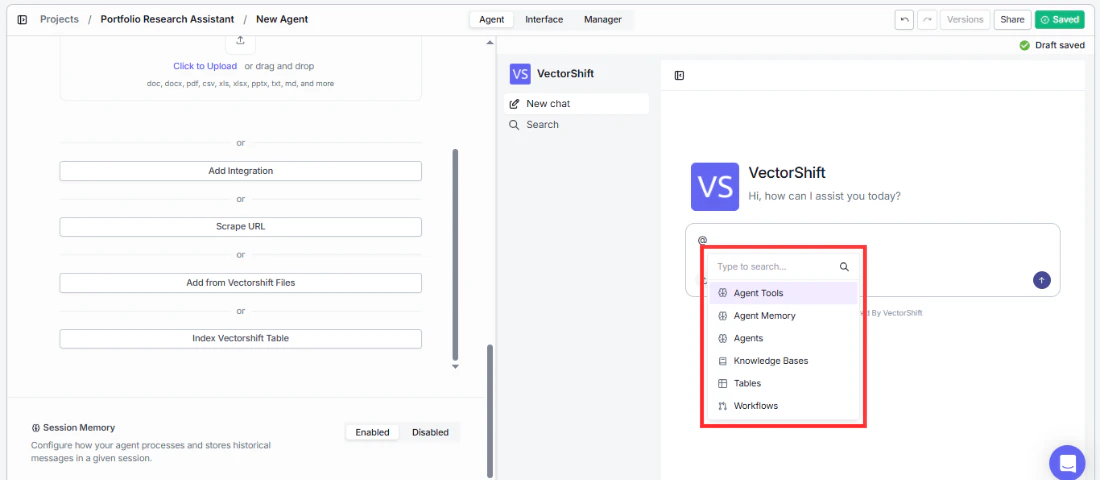
The @ tag menu is one of the most powerful ways to direct your Agent’s behavior during a conversation. It lets you explicitly point the Agent to specific resources instead of relying on it to choose automatically. In the chat input, you can type @ to open a searchable dropdown menu that lets you reference specific resources directly in your message. This works both in the builder preview and in the deployed chatbot. @ tag dropdown menu in chat input The available resource types, in the order they appear in the dropdown, are:
  • Agent Tools: Reference a specific tool to prompt the Agent to use it.
  • Agent Memory: Reference the Agent’s stored memory from the current session.
  • Agents: Tag another Agent to bring it into the conversation.
  • Knowledge Bases: Point the Agent to a specific Knowledge Base for its response.
  • Tables: Reference a VectorShift Table for data lookups.
  • Workflows: Trigger a specific Workflow from within the chat.
You can also type to search within the dropdown to quickly find the resource you need. For example, in a multi-desk finance setup you could type “@Fixed Income Agent What is the current yield curve?” to send that question directly to the Fixed Income sub-agent, or “@Q4 Holdings Report what is our NVIDIA allocation?” to force the Agent to query that specific document rather than its general knowledge base.
When to use @ tags:
  • Reference a specific Knowledge Base: @Customer FAQ What is the return policy for international orders?” — forces the Agent to search that specific KB instead of choosing on its own.
  • Route to a sub-agent: @Compliance Agent Does this trade require pre-clearance?” — sends the question directly to the Compliance sub-agent.
  • Force a specific tool: @Code Interpreter Plot a bar chart of Q3 revenue by region” — ensures the Agent uses the Code Interpreter rather than another tool.
  • Reference a Table: @Sales Pipeline Show me all deals closing this month” — points the Agent to a specific VectorShift Table for data lookups.
You can combine @ tags with natural language to be precise about what you want the Agent to do.