
Use this node from the SDK
Add it in Python with
pipeline.add(name="...").ai_routing(...). See the SDK reference.Core Functionality
- Classifies an input message using a configurable LLM provider and model
- Routes execution to one of multiple user-defined paths based on the classification result
- Supports any number of paths, each with a natural-language description the LLM uses to decide the match
- Does not produce data outputs — downstream nodes reference previous nodes’ output fields directly
Tool Inputs
Message* — The text the AI router will classify to determine which path to execute. Required. Text.Shared Memory— Additional context the AI uses when determining the routing. Text. Use this to pass conversation history or other background information that helps the model make a more accurate classification.Provider— The LLM provider to use for classification. Dropdown, default:OpenAI.-Model— The specific model to use for classification. Dropdown, default:gpt-4o.-Temperature— Controls randomness in the model’s classification. Decimal, default:0.7. Lower values produce more deterministic routing.-Max Tokens— The maximum number of tokens the model can generate. Integer, default:2048.-Top P— Nucleus sampling parameter. Decimal, default:1.0.-Path Descriptions— Each path has a natural-language description (e.g., “Customer is asking about billing” or “Document is a tax form”). The LLM reads these descriptions to decide which path matches the input message.
Tool Outputs
The AI Routing node does not produce data outputs. It evaluates which path to execute based on the classification. To access data in downstream nodes, reference the output fields of nodes that ran before the AI Routing node.- Workflows
Overview
In workflows, the AI Routing node sits between upstream data-producing nodes and multiple downstream branches. It reads theMessage input, uses the configured LLM to classify it against the path descriptions, and activates the matching branch. Use it when you need intelligent, content-aware branching that goes beyond simple string matching — for example, routing support tickets by intent or dispatching financial documents to the right extraction workflow.Use Cases
- Route incoming customer messages to billing, technical support, or sales workflows based on intent classification
- Direct financial documents (invoices, tax forms, contracts) to specialized extraction workflows based on document type
- Classify transaction descriptions and route to the appropriate categorization or compliance review path
- Triage risk alerts by severity and route to escalation or standard processing branches
- Sort incoming emails by topic and forward to the correct department workflow
How It Works
Step 1: Add the AI Routing Node
In the workflow canvas, click the Logic tab in the node palette and click AI Routing. Drag it onto the canvas.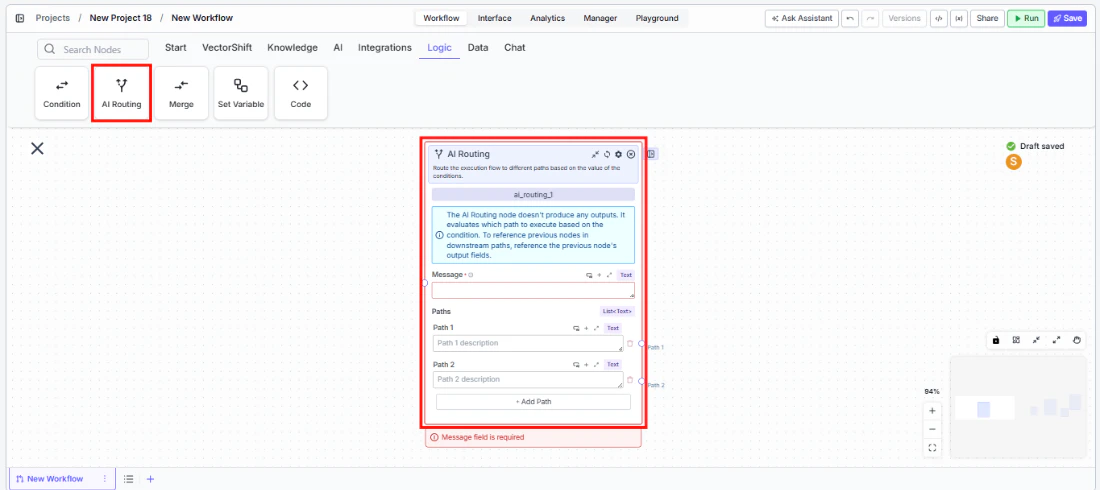
Step 2: Write the Message Input
In theMessage field, type the text the AI should classify, or connect it from an upstream node’s output. This field is required — the node displays a validation error if left empty.Step 3: Define Paths
Each path has a description field. Write a clear, natural-language description of what qualifies a message for that path — for example, “The customer is asking about pricing or billing” or “The document is a quarterly earnings report.”- Path 1 comes pre-configured. Enter its description.
- Path 2 comes pre-configured. Enter its description.
- Click + Add Path at the bottom to add more paths as needed.
Step 4: Configure the AI Model (Optional)
The right side of the node exposes advanced model settings:Provider— Select the LLM provider (default: OpenAI).Model— Select the specific model (default: gpt-4o).Temperature— Adjust classification randomness (default: 0.7). Use lower values for more consistent routing.Max Tokens— Set the token limit (default: 2048).Top P— Adjust nucleus sampling (default: 1.0).
Shared Memory to give the model additional context for classification.Step 5: Connect Downstream Nodes
Connect each path’s output handle to the downstream nodes that should execute for that classification. Downstream nodes reference the output fields of nodes that ran before the AI Routing node — the AI Routing node itself does not pass data through.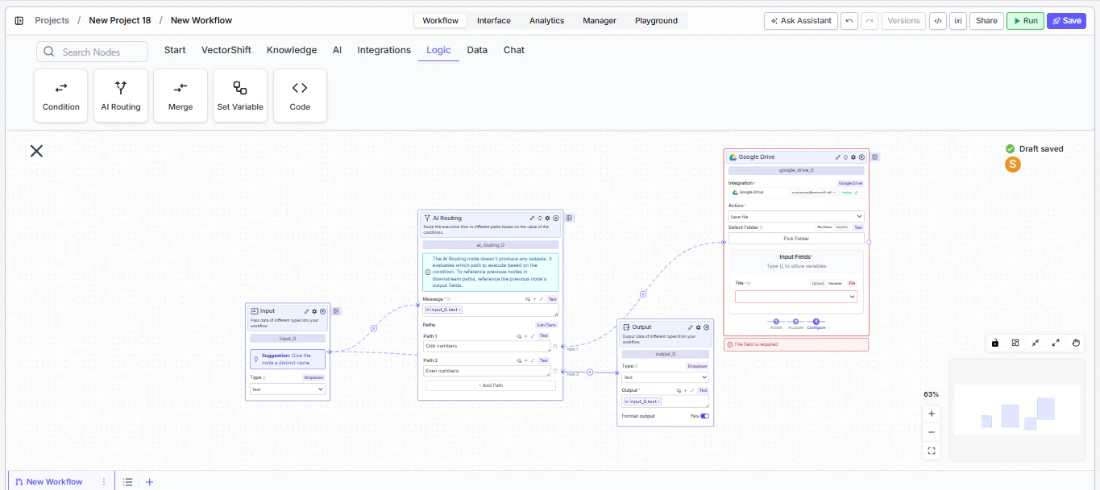
Step 6: Test the Workflow
Click Run to test the workflow. Provide a sample message and verify that the AI routes it to the correct path.Settings
Best Practices
- Write distinct path descriptions. The LLM classifies based on descriptions — make them clearly distinguishable. Avoid overlapping language like “billing questions” and “payment questions” in separate paths.
- Use low temperature for critical routing. In financial workflows where misrouting has consequences (e.g., compliance vs. general inquiries), set temperature to 0.1–0.3 for more deterministic classification.
- Add a catch-all path. Include a final path with a description like “Any message that does not match the above categories” to handle edge cases.
- Leverage Shared Memory for context. When routing depends on prior conversation history (e.g., a follow-up message about an earlier topic), pass the conversation context into
Shared Memory. - Keep path count manageable. More paths increase the chance of misclassification. If you need many branches, consider cascading AI Routing nodes — first route by broad category, then sub-route within each branch.
Related Templates
Document Classification Agent
Automatically categorizes and tags incoming documents based on content and type.
Application Risk Agent
Assesses risk levels in incoming applications using scoring models and policy rules.
Refund/Expense Approval AI Agent
Reviews and routes refund or expense requests based on policy rules and approval thresholds.
CapEx Classification AI Agent
Classifies capital expenditure items against accounting standards and internal policies.