> ## Documentation Index
> Fetch the complete documentation index at: https://docs.vectorshift.ai/llms.txt
> Use this file to discover all available pages before exploring further.
# Text to SQL Node
> Generate SQL from natural language
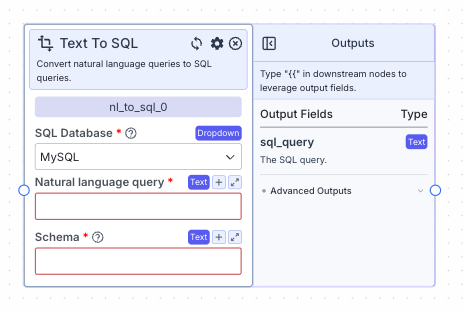 The text to SQL node allows you to generate SQL queries from natural language.
## Node Inputs
1. Natural language query: The query in natural language
* Type: `Text`
2. Schema: The schema you want the SQL query to follow
* Type: `Text`
## Node Parameters
On the face of the node:
1. SQL Database: Choose the SQL database the data is in. The available options are: MySQL, PostgreSQL, Snowflake and SQLite3. The default database is MySQL.
In the gear:
1. LLM model: The llm model you want to use to generate the query. The available options are: o3-mini, o1, o1-mini, o1-preview, chatgpt-4o-latest, gpt-4o, gpt-4o-2024-08-06, gpt-4o-mini, gpt-4-turbo, gpt-4-turbo-2024-04-09, gpt-4 and gpt-3.5-turbo. The default value is gpt-4o.
## Node Outputs
1. SQL Query: The SQL query generated by the llm
* Type: `Text`
* Example usage: `{{nl_to_sql_0.sql_query}}`
## Example
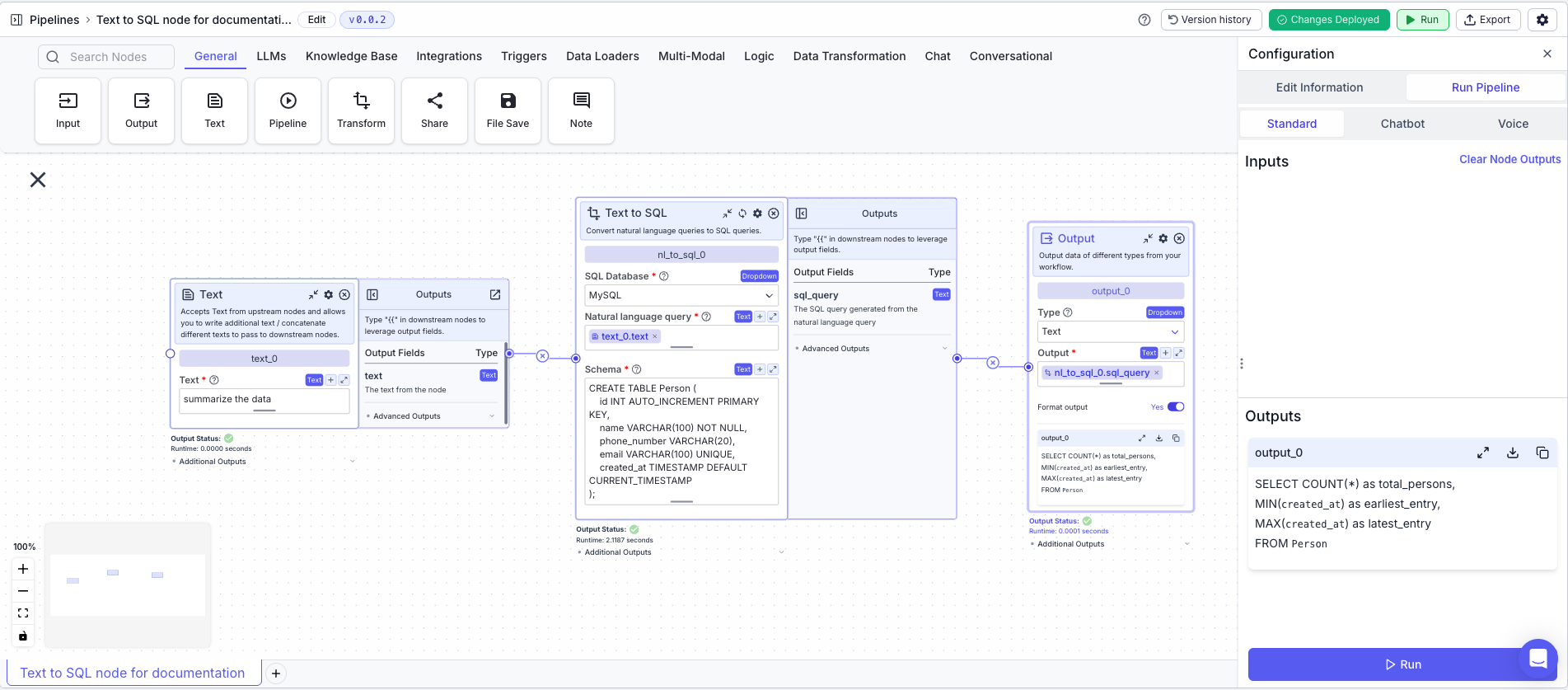
The below example is a pipeline which uses the text to SQL node to generate a SQL query from natural language.
1. Text Node: Stores the natural language query
* Text: `Summarize the data`
2. Text to SQL Node: Generates the SQL query
* SQL Database: MySQL
* Natural language query: `{{input_0.text}}`
* Schema: `CREATE TABLE Person (
id INT AUTO_INCREMENT PRIMARY KEY,
name VARCHAR(100) NOT NULL,
phone_number VARCHAR(20),
email VARCHAR(100) UNIQUE,
created_at TIMESTAMP DEFAULT CURRENT_TIMESTAMP
);`
3. Output Node: Outputs the SQL query
* Output: `{{nl_to_sql_0.sql_query}}`
The text to SQL node allows you to generate SQL queries from natural language.
## Node Inputs
1. Natural language query: The query in natural language
* Type: `Text`
2. Schema: The schema you want the SQL query to follow
* Type: `Text`
## Node Parameters
On the face of the node:
1. SQL Database: Choose the SQL database the data is in. The available options are: MySQL, PostgreSQL, Snowflake and SQLite3. The default database is MySQL.
In the gear:
1. LLM model: The llm model you want to use to generate the query. The available options are: o3-mini, o1, o1-mini, o1-preview, chatgpt-4o-latest, gpt-4o, gpt-4o-2024-08-06, gpt-4o-mini, gpt-4-turbo, gpt-4-turbo-2024-04-09, gpt-4 and gpt-3.5-turbo. The default value is gpt-4o.
## Node Outputs
1. SQL Query: The SQL query generated by the llm
* Type: `Text`
* Example usage: `{{nl_to_sql_0.sql_query}}`
## Example
The below example is a pipeline which uses the text to SQL node to generate a SQL query from natural language.
1. Text Node: Stores the natural language query
* Text: `Summarize the data`
2. Text to SQL Node: Generates the SQL query
* SQL Database: MySQL
* Natural language query: `{{input_0.text}}`
* Schema: `CREATE TABLE Person (
id INT AUTO_INCREMENT PRIMARY KEY,
name VARCHAR(100) NOT NULL,
phone_number VARCHAR(20),
email VARCHAR(100) UNIQUE,
created_at TIMESTAMP DEFAULT CURRENT_TIMESTAMP
);`
3. Output Node: Outputs the SQL query
* Output: `{{nl_to_sql_0.sql_query}}`
 xt to
xt to