> ## Documentation Index
> Fetch the complete documentation index at: https://docs.vectorshift.ai/llms.txt
> Use this file to discover all available pages before exploring further.
# LLM Node
> Utilize LLMs in your pipelines
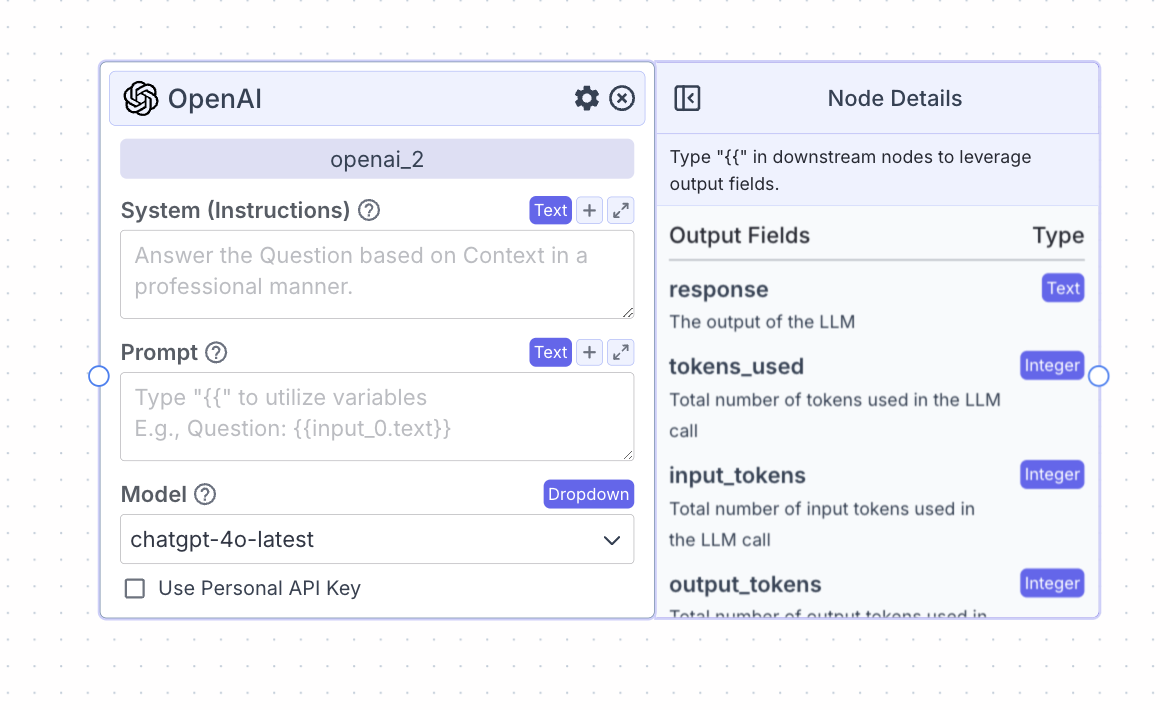 The LLM node allows you to connect to a variety of LLM providers and use them in your pipelines.
## Node Inputs
1. System (Instructions): Specify how you would like the LLM to respond (e.g., the style). It is common to specify here how the LLM should utilize the data received in Prompt.
* Type: `Text`
2. Prompt: Provide the data the LLM should consider. Type `{{` to open the variable builder.
* Type: `Text`
## Node Parameters
On the face of the node:
1. Model: Select the model to use from the provider
In the gear:
1. Provider: Change the provider of the LLM.
2. Max tokens: The maximum number of output tokens for each LLM run.
3. Temperature: The diversity of the LLM generation. To have more diverse or creative generations, increase the temperature. To have more deterministic response, decrease the temperature.
4. Top P: The Top P parameter constrains how many tokens the LLM considers for generation at each step. For more diverse responses increase top p towards a maximum value of 1.0. This setting is found in the gear on the LLM node.
5. Stream Response: Check to have responses from the LLM stream. Ensure to change the Type on the output node to “Streamed Text”.
6. JSON Output: Check to to have the model return a structured JSON output rather than pure text.
7. Show Sources: Display sources of documents used from the knowledge base.
8. Show Confidence: Show the confidence level of the LLM’s answer.
9. Toxic Input Filtration: Filter out toxic content; if the LLM receives a toxic message, the LLM will respond with a respectful one.
10. Detect PII: Detect and remove PII from being sent to the LLM.
## Node Outputs
1. Response: The output of the LLM
* Type: `Text` (or `Stream` if streaming is enabled)
* Example usage: `{{openai_0.response}}`
2. Tokens\_used: The total number of tokens used
* Type: `Integer`
* Example usage: `{{openai_0.tokens_used}}`
3. Input\_tokens: The total number of input tokens used
* Type: `Integer`
* Example usage: `{{openai_0.input_tokens}}`
4. Output\_tokens: The total number of output tokens used
* Type: `Integer`
* Example usage: `{{openai_0.output_tokens}}`
5. Credits\_used: The total number of VectorShift AI credits used
* Type: `Decimal`
* Example usage: `{{openai_0.credits_used}}`
## Example
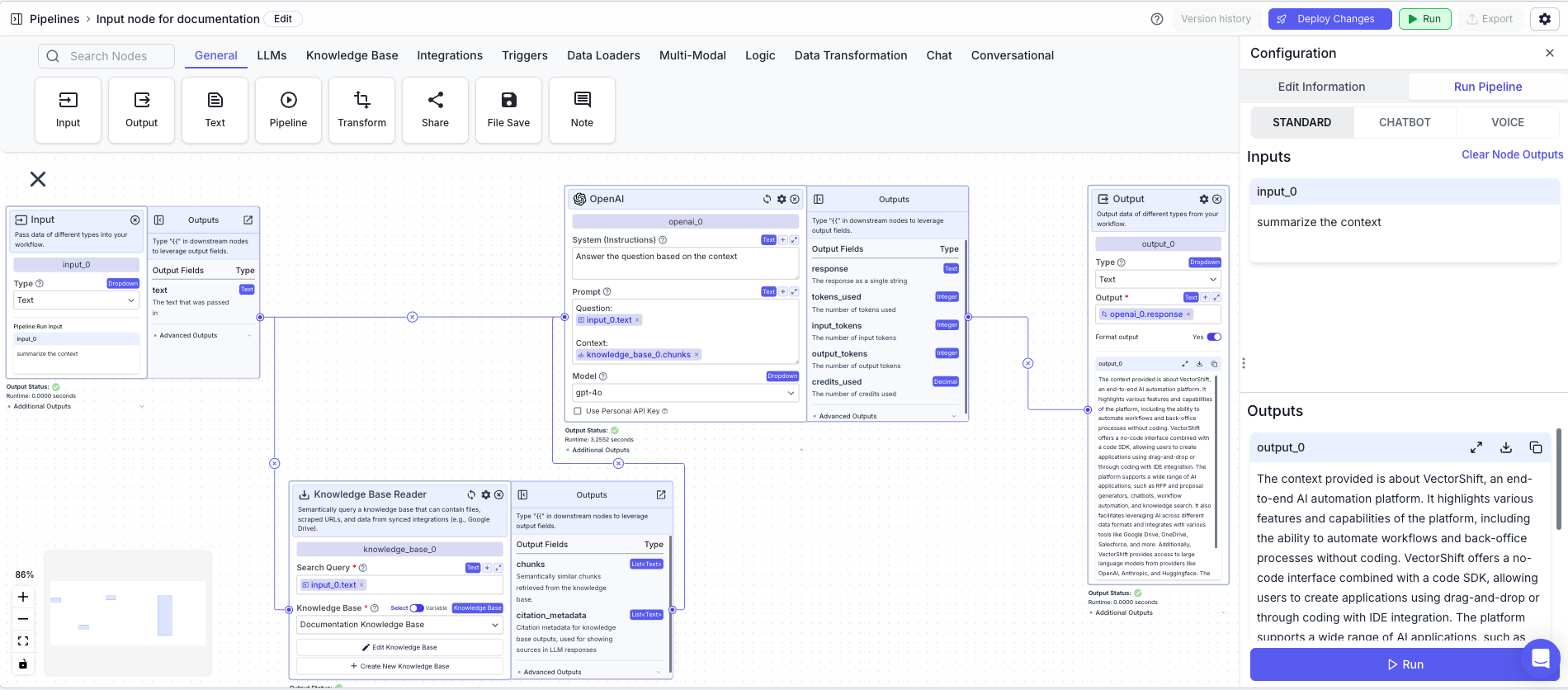
The below example is a pipeline for chatting with a knowledge base. The LLM is used to generate the response to the user question.
1. Input Node: Represents the user message
2. Knowledge Base Reader Node: Queries the knowledge base semantically
* Search Query: `{{input_0.text}}`
3. LLM Node: Responds to the user question
* System (Instructions): `Answer the question based on the context.`
* Prompt: `Question: {{input_0.text}} Context: {{knowledge_base_1.chunks}}`
4. Output Node: Displays the response
* Output: `{{openai_0.response}}`
The LLM node allows you to connect to a variety of LLM providers and use them in your pipelines.
## Node Inputs
1. System (Instructions): Specify how you would like the LLM to respond (e.g., the style). It is common to specify here how the LLM should utilize the data received in Prompt.
* Type: `Text`
2. Prompt: Provide the data the LLM should consider. Type `{{` to open the variable builder.
* Type: `Text`
## Node Parameters
On the face of the node:
1. Model: Select the model to use from the provider
In the gear:
1. Provider: Change the provider of the LLM.
2. Max tokens: The maximum number of output tokens for each LLM run.
3. Temperature: The diversity of the LLM generation. To have more diverse or creative generations, increase the temperature. To have more deterministic response, decrease the temperature.
4. Top P: The Top P parameter constrains how many tokens the LLM considers for generation at each step. For more diverse responses increase top p towards a maximum value of 1.0. This setting is found in the gear on the LLM node.
5. Stream Response: Check to have responses from the LLM stream. Ensure to change the Type on the output node to “Streamed Text”.
6. JSON Output: Check to to have the model return a structured JSON output rather than pure text.
7. Show Sources: Display sources of documents used from the knowledge base.
8. Show Confidence: Show the confidence level of the LLM’s answer.
9. Toxic Input Filtration: Filter out toxic content; if the LLM receives a toxic message, the LLM will respond with a respectful one.
10. Detect PII: Detect and remove PII from being sent to the LLM.
## Node Outputs
1. Response: The output of the LLM
* Type: `Text` (or `Stream` if streaming is enabled)
* Example usage: `{{openai_0.response}}`
2. Tokens\_used: The total number of tokens used
* Type: `Integer`
* Example usage: `{{openai_0.tokens_used}}`
3. Input\_tokens: The total number of input tokens used
* Type: `Integer`
* Example usage: `{{openai_0.input_tokens}}`
4. Output\_tokens: The total number of output tokens used
* Type: `Integer`
* Example usage: `{{openai_0.output_tokens}}`
5. Credits\_used: The total number of VectorShift AI credits used
* Type: `Decimal`
* Example usage: `{{openai_0.credits_used}}`
## Example
The below example is a pipeline for chatting with a knowledge base. The LLM is used to generate the response to the user question.
1. Input Node: Represents the user message
2. Knowledge Base Reader Node: Queries the knowledge base semantically
* Search Query: `{{input_0.text}}`
3. LLM Node: Responds to the user question
* System (Instructions): `Answer the question based on the context.`
* Prompt: `Question: {{input_0.text}} Context: {{knowledge_base_1.chunks}}`
4. Output Node: Displays the response
* Output: `{{openai_0.response}}`