> ## Documentation Index
> Fetch the complete documentation index at: https://docs.vectorshift.ai/llms.txt
> Use this file to discover all available pages before exploring further.
# Semantic Search Node
> Embed and query documents semantically within a pipeline run
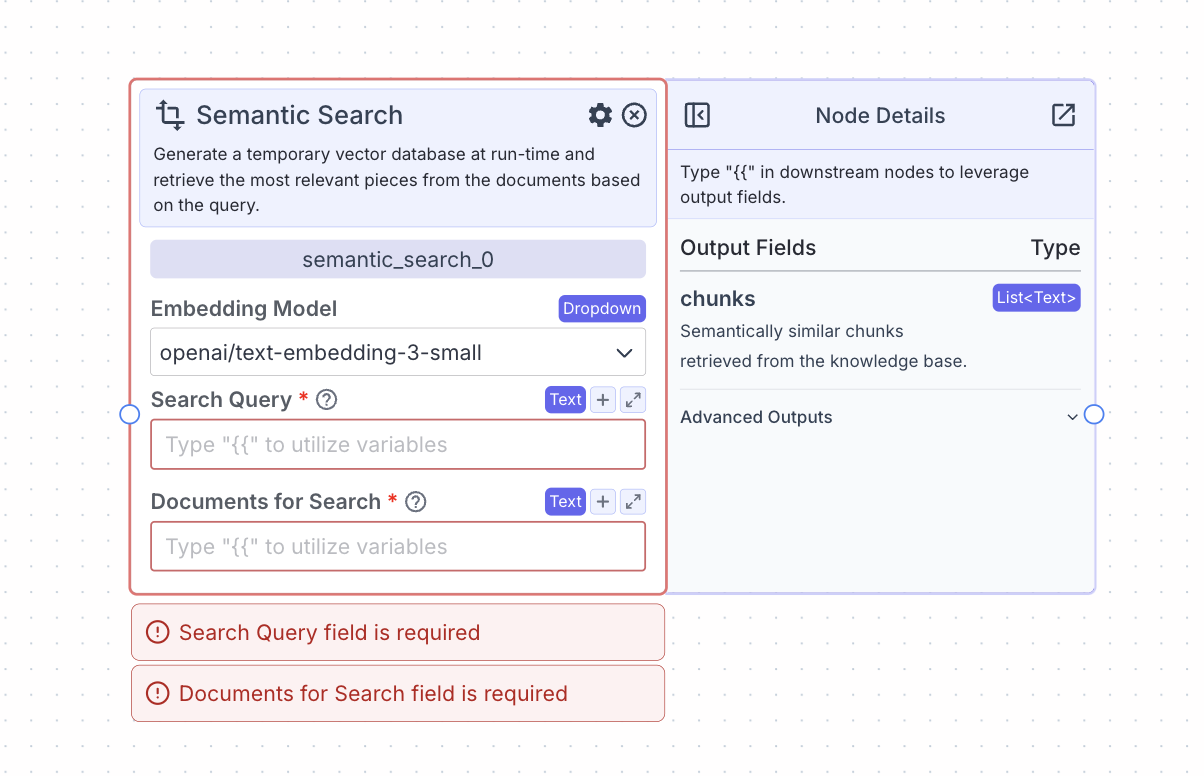 The semantic search nodes embeds and queries documents semantically at run time.
In contrast to the knowledge base, which is a permanent store of data, documents embedded using the semantic search node are immediately deleted after the pipeline finishes running.
## Node Inputs
1. Search Query: The query that will be used to search the embedded documents semantically for relevant pieces
* Type: `Text`
2. Documents for Search: The text that will be semantically searched
* Type: `Text`
## Node Parameters
On the face of the node:
1. Embedding model: The embedding model to use to embed the documents
* Type: `Dropdown`
In the gear:
1. Max chunks per query: the maximum number of pieces of data to be returned per query
2. Enable Filter: enable the ability to write a metadata filter
3. Enable Context: enable a text field to provide additional context for the search query
4. Re-rank documents: Performs an additional reranking step to reorder the documents by relevance to the query
5. Score Cutoff: The minimum relevancy score (between 0 and 1) that each piece of data will have semantically to the query
6. Retrieval Unit: Return the most relevant chunks (text content) or Documents (will return document metadata)
7. Transform Query: Transform the query for better results
8. Answer Multiple Questions: Extract separate questions from the query and retrieve content separately for each question to improve search performance
9. Expand Query: Expand query to improve semantic search
10. Do Advanced QA: Use additional LLM calls to analyze each document to improve answer correctness
11. Show Immediate Steps: Display the process the knowledge base is conducting at a given time in the chatUI
12. Format Context for an LLM: Do an additional LLM call to format output
## Node Outputs
**If Retrieval Unit is set to Chunks**
1. Chunks: Semantically similar chunks retrieved from the documents
* Type: `List`
* Example usage: `{{semantic_search_0.chunks}}`
**If Retrieval Unit is set to Documents**
1. Documents: Metadata for semantically similar documents retrieved from the documents
* Type: `List`
* Example usage: `{{semantic_search_0.documents}}`
**If "Do Advanced QA" is enabled**
1. Response: A direct answer to the query
* Type: `Text`
* Example usage: `{{semantic_search_0.response}}`
## Considerations
* Use a semantic search node when your pipeline loads new data at run time for querying. Use a Knowledge Base Reader node when you want to query previously loaded data that has already been loaded.
* If the semantic search node is not returning relevant information to a query, try increasing the number of max chunks per query in the gear of the knowledge base.
* For debugging purposes, you may attach an output node to the semantic search node to view the chunks that are returned for the query.
## Example
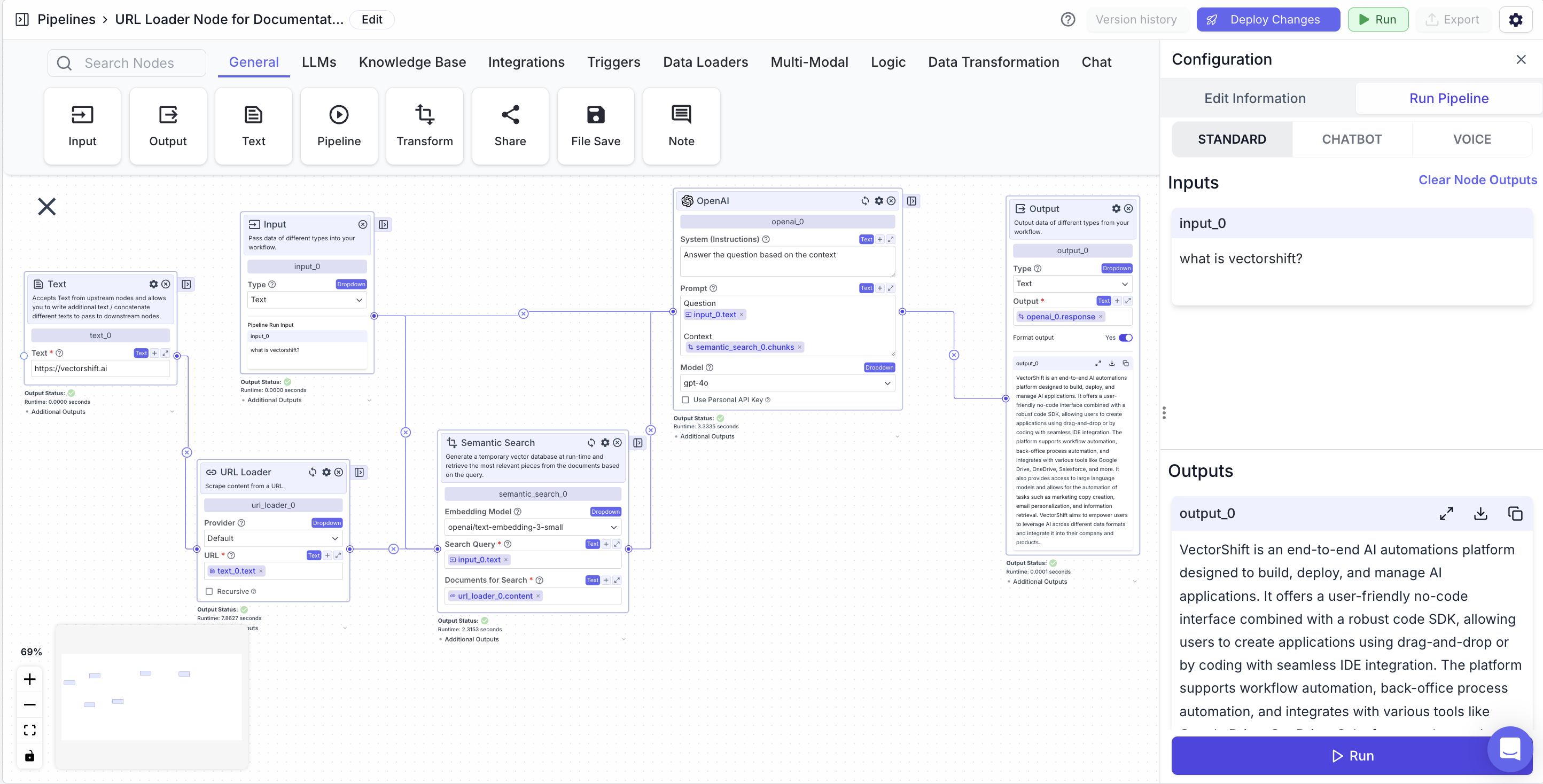
The below example is a pipeline which answers questions about on the contents of a website (example is with VectorShift's website).
* Input Node: The query about the website.
* Text Node: The URL for the website.
* Scrape URL node: Scrape the website URL
* URL: `{{text_0.text}}`
* Semantic Search Node: Find semantically similar chunks to a question (input node) based on a website (Scrape URL node).
* Search Query: `{{input_0.text}}`
* Documents for Search: `{{url_loader_0.content}}`
* LLM Node: Answer a user query (input node) based on relevant information (semantic search node).
* Prompt: `{{input_0.text}} and {{semantic_search_0.chunks}}`
* Output Node: Display the LLM's response.
* Output: `{{openai_0.response}}`
The semantic search nodes embeds and queries documents semantically at run time.
In contrast to the knowledge base, which is a permanent store of data, documents embedded using the semantic search node are immediately deleted after the pipeline finishes running.
## Node Inputs
1. Search Query: The query that will be used to search the embedded documents semantically for relevant pieces
* Type: `Text`
2. Documents for Search: The text that will be semantically searched
* Type: `Text`
## Node Parameters
On the face of the node:
1. Embedding model: The embedding model to use to embed the documents
* Type: `Dropdown`
In the gear:
1. Max chunks per query: the maximum number of pieces of data to be returned per query
2. Enable Filter: enable the ability to write a metadata filter
3. Enable Context: enable a text field to provide additional context for the search query
4. Re-rank documents: Performs an additional reranking step to reorder the documents by relevance to the query
5. Score Cutoff: The minimum relevancy score (between 0 and 1) that each piece of data will have semantically to the query
6. Retrieval Unit: Return the most relevant chunks (text content) or Documents (will return document metadata)
7. Transform Query: Transform the query for better results
8. Answer Multiple Questions: Extract separate questions from the query and retrieve content separately for each question to improve search performance
9. Expand Query: Expand query to improve semantic search
10. Do Advanced QA: Use additional LLM calls to analyze each document to improve answer correctness
11. Show Immediate Steps: Display the process the knowledge base is conducting at a given time in the chatUI
12. Format Context for an LLM: Do an additional LLM call to format output
## Node Outputs
**If Retrieval Unit is set to Chunks**
1. Chunks: Semantically similar chunks retrieved from the documents
* Type: `List`
* Example usage: `{{semantic_search_0.chunks}}`
**If Retrieval Unit is set to Documents**
1. Documents: Metadata for semantically similar documents retrieved from the documents
* Type: `List`
* Example usage: `{{semantic_search_0.documents}}`
**If "Do Advanced QA" is enabled**
1. Response: A direct answer to the query
* Type: `Text`
* Example usage: `{{semantic_search_0.response}}`
## Considerations
* Use a semantic search node when your pipeline loads new data at run time for querying. Use a Knowledge Base Reader node when you want to query previously loaded data that has already been loaded.
* If the semantic search node is not returning relevant information to a query, try increasing the number of max chunks per query in the gear of the knowledge base.
* For debugging purposes, you may attach an output node to the semantic search node to view the chunks that are returned for the query.
## Example
The below example is a pipeline which answers questions about on the contents of a website (example is with VectorShift's website).
* Input Node: The query about the website.
* Text Node: The URL for the website.
* Scrape URL node: Scrape the website URL
* URL: `{{text_0.text}}`
* Semantic Search Node: Find semantically similar chunks to a question (input node) based on a website (Scrape URL node).
* Search Query: `{{input_0.text}}`
* Documents for Search: `{{url_loader_0.content}}`
* LLM Node: Answer a user query (input node) based on relevant information (semantic search node).
* Prompt: `{{input_0.text}} and {{semantic_search_0.chunks}}`
* Output Node: Display the LLM's response.
* Output: `{{openai_0.response}}`