> ## Documentation Index
> Fetch the complete documentation index at: https://docs.vectorshift.ai/llms.txt
> Use this file to discover all available pages before exploring further.
# Share Object Node
> Share a VectorShift object with another user
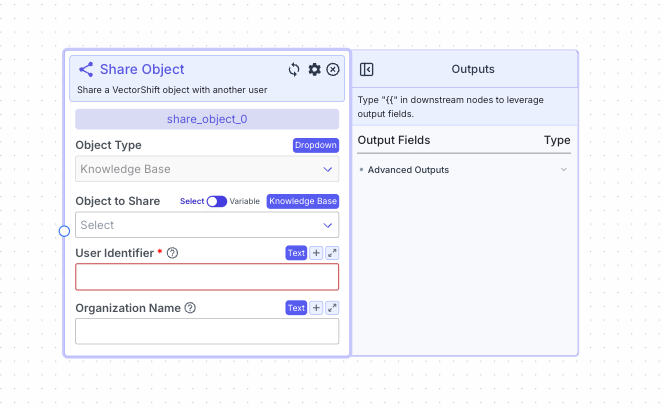 This node allows you to share a VectorShift Knowledge Base object with another user.
## Node Inputs
1. Object to share: The object you want to share with the user (currently only object available is knowledge bases).
* Type: `Knowledge Base`
2. User Identifier: The username or email of the user you want to share with
* Type: `Text`
3. Organization Name: The name of the organization of the user Note: Leave blank if user is not part of Organization
* Type: `Text`
For providing the object to share you have two options:
1. If toggle is on Select: Select an existing Knowledge Base from the platform
2. If toggle is on Variable: Reference Knowledge Base from other nodes
## Node Outputs
No outputs for this node.
## Example
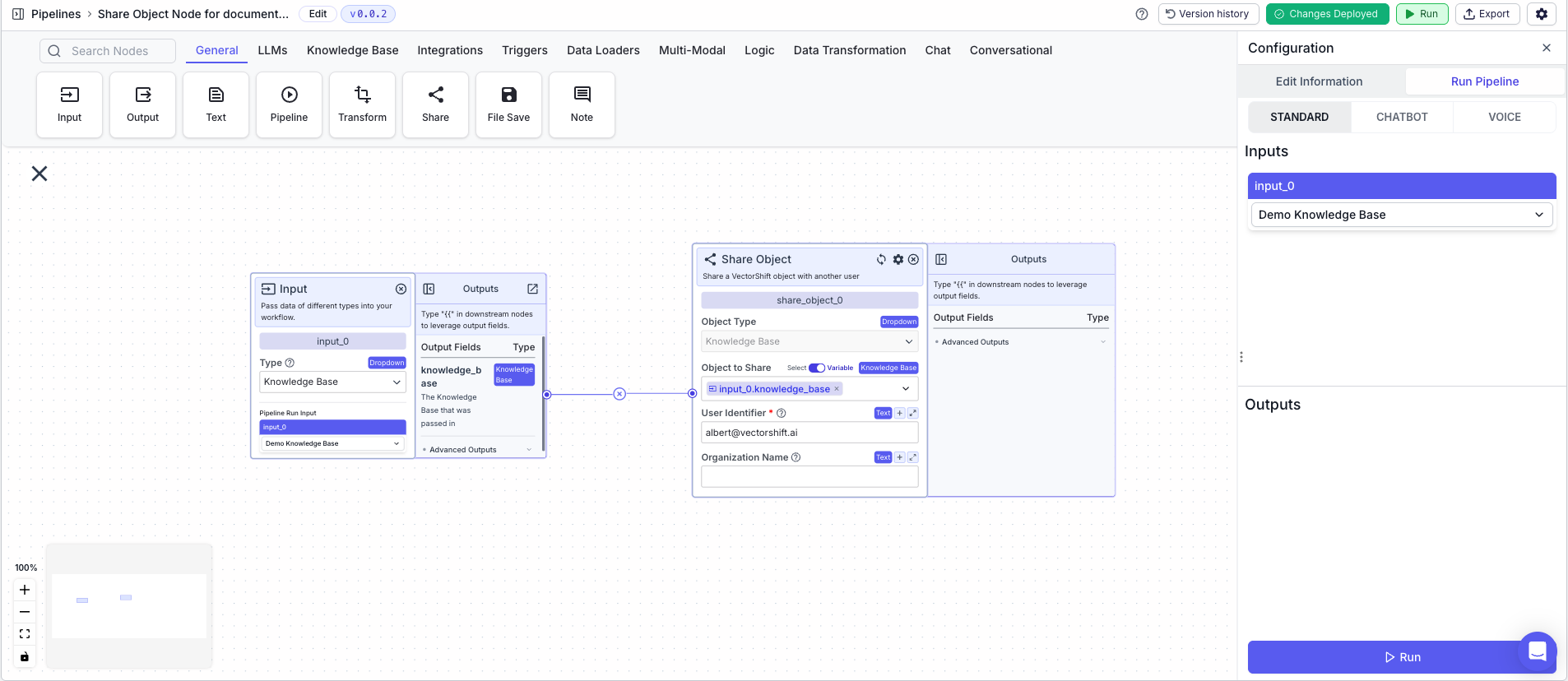
The below example is a pipeline which shares a Knowledge Base with the user `albert@vectorshift.ai`.
1. Input Node: The Knowledge Base you want to share
1. Type `Knowledge Base`
2. Save Object Node: Shares the Knowledge Base with the user
* Object to share: `{{input_0.knowledge_base}}`
* Variable: `True`
* User Identifier: `albert@vectorshift.ai`
This node allows you to share a VectorShift Knowledge Base object with another user.
## Node Inputs
1. Object to share: The object you want to share with the user (currently only object available is knowledge bases).
* Type: `Knowledge Base`
2. User Identifier: The username or email of the user you want to share with
* Type: `Text`
3. Organization Name: The name of the organization of the user Note: Leave blank if user is not part of Organization
* Type: `Text`
For providing the object to share you have two options:
1. If toggle is on Select: Select an existing Knowledge Base from the platform
2. If toggle is on Variable: Reference Knowledge Base from other nodes
## Node Outputs
No outputs for this node.
## Example
The below example is a pipeline which shares a Knowledge Base with the user `albert@vectorshift.ai`.
1. Input Node: The Knowledge Base you want to share
1. Type `Knowledge Base`
2. Save Object Node: Shares the Knowledge Base with the user
* Object to share: `{{input_0.knowledge_base}}`
* Variable: `True`
* User Identifier: `albert@vectorshift.ai`