> ## Documentation Index
> Fetch the complete documentation index at: https://docs.vectorshift.ai/llms.txt
> Use this file to discover all available pages before exploring further.
# Chunk Text Node
> Split Text into chunks
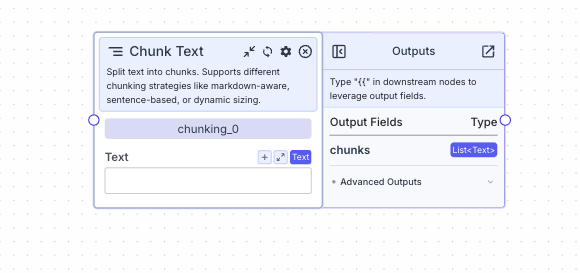 Split text into chunks (list of text). Supports different chunking strategies like markdown-aware, sentence-based, or dynamic sizing.
## Node Inputs
1. Text: The text for chunking
* Type: `Text`
## Node Parameters
In the gear:
1. Chunk Size: The size of each chunk of text in number of tokens. One token = 4 characters. The default value is `512 tokens`. The value ranges from `1` to `4096`.
* Type: `Text`
2. Chunk Overlap: The overlap of each chunk text in number of tokens. One token = 4 characters. The default value is `0`. The value ranges from `0` to `4096`.
* Type: `Text`
3. Chunk Strategy: Strategy for grouping segmented text into final chunks. `sentence`: groups sentences, `markdown`: respects markdown structure (headers, code), `dynamic`: optimizes breaks for size using chosen segmentation method (see below). The default option is `Markdown`.
* Type: `Dropdown`
If `Dynamic` is selected as the chunk strategy:
1. Segmentation Method: The method to break text into units before chunking. `words`: splits by word, `sentences`: splits by sentence boundary, `paragraphs`: splits by blank line/paragraph. The default option is `words`.
* Type: `Dropdown`
## Node Outputs
1. Chunks: The chunked text in a list
* Type: `List`
* Example usage: `{{chunking_0.chunks}}`
## Example
The below example shows a pipeline that takes a blog, chunks it into a list of text, and summarizes each chunk.
1. Text Node: Contains the text
* Text: `The text from the blog`
2. Chunk Text Node: Splits the text into chunks of text based on the chunk size and overlap
* Text: `{{text_0.text}}`
3. Summarizer Node: Summarizes each chunk in the list (list mode applies the operation, in this case, summarization, onto each item in the list)
* List Mode: `True`
* Text for summarization: `{{chunking_0.chunks}}`
4. Output: Display the list of summaries
* Output: `{{summarizer_0.summary}}`
Split text into chunks (list of text). Supports different chunking strategies like markdown-aware, sentence-based, or dynamic sizing.
## Node Inputs
1. Text: The text for chunking
* Type: `Text`
## Node Parameters
In the gear:
1. Chunk Size: The size of each chunk of text in number of tokens. One token = 4 characters. The default value is `512 tokens`. The value ranges from `1` to `4096`.
* Type: `Text`
2. Chunk Overlap: The overlap of each chunk text in number of tokens. One token = 4 characters. The default value is `0`. The value ranges from `0` to `4096`.
* Type: `Text`
3. Chunk Strategy: Strategy for grouping segmented text into final chunks. `sentence`: groups sentences, `markdown`: respects markdown structure (headers, code), `dynamic`: optimizes breaks for size using chosen segmentation method (see below). The default option is `Markdown`.
* Type: `Dropdown`
If `Dynamic` is selected as the chunk strategy:
1. Segmentation Method: The method to break text into units before chunking. `words`: splits by word, `sentences`: splits by sentence boundary, `paragraphs`: splits by blank line/paragraph. The default option is `words`.
* Type: `Dropdown`
## Node Outputs
1. Chunks: The chunked text in a list
* Type: `List`
* Example usage: `{{chunking_0.chunks}}`
## Example
The below example shows a pipeline that takes a blog, chunks it into a list of text, and summarizes each chunk.
1. Text Node: Contains the text
* Text: `The text from the blog`
2. Chunk Text Node: Splits the text into chunks of text based on the chunk size and overlap
* Text: `{{text_0.text}}`
3. Summarizer Node: Summarizes each chunk in the list (list mode applies the operation, in this case, summarization, onto each item in the list)
* List Mode: `True`
* Text for summarization: `{{chunking_0.chunks}}`
4. Output: Display the list of summaries
* Output: `{{summarizer_0.summary}}`