> ## Documentation Index
> Fetch the complete documentation index at: https://docs.vectorshift.ai/llms.txt
> Use this file to discover all available pages before exploring further.
# Write JSON Value Node
> Write a value to a JSON object
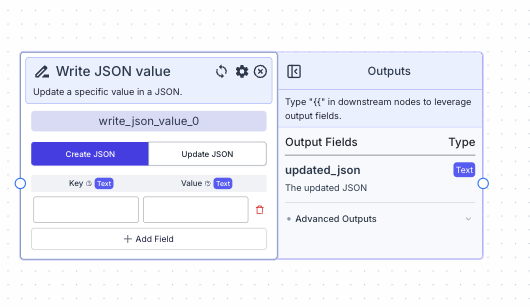 This node allows you to add or update a specific value in a JSON string.
## Node Inputs
If "Create JSON" is selected:
1. Key: The key of json. Note: Enclose in "" if your key contains special characters.
* Type: `Text`
2. Value: The value to be added to the JSON object.
* Type: `Text`
If "Update JSON" is selected:
1. JSON string: The JSON string you want to update
* Type: `Text`
2. Key: The key of json. Note: Enclose in "" if your key contains special characters.
* Type: `Text`
3. Value: The value to be added to the JSON object.
* Type: `Text`
## Node Parameters
Create JSON vs Update JSON toggle:
* Create JSON: This will create a new JSON string with the key value pairs provided.
* Update JSON: This will update the given JSON string with the key value pairs provided.
## Node Outputs
1. Updated JSON: The updated JSON string
* Type: `Text`
* Example usage: `{{write_json_value_0.updated_json}}`
## Example
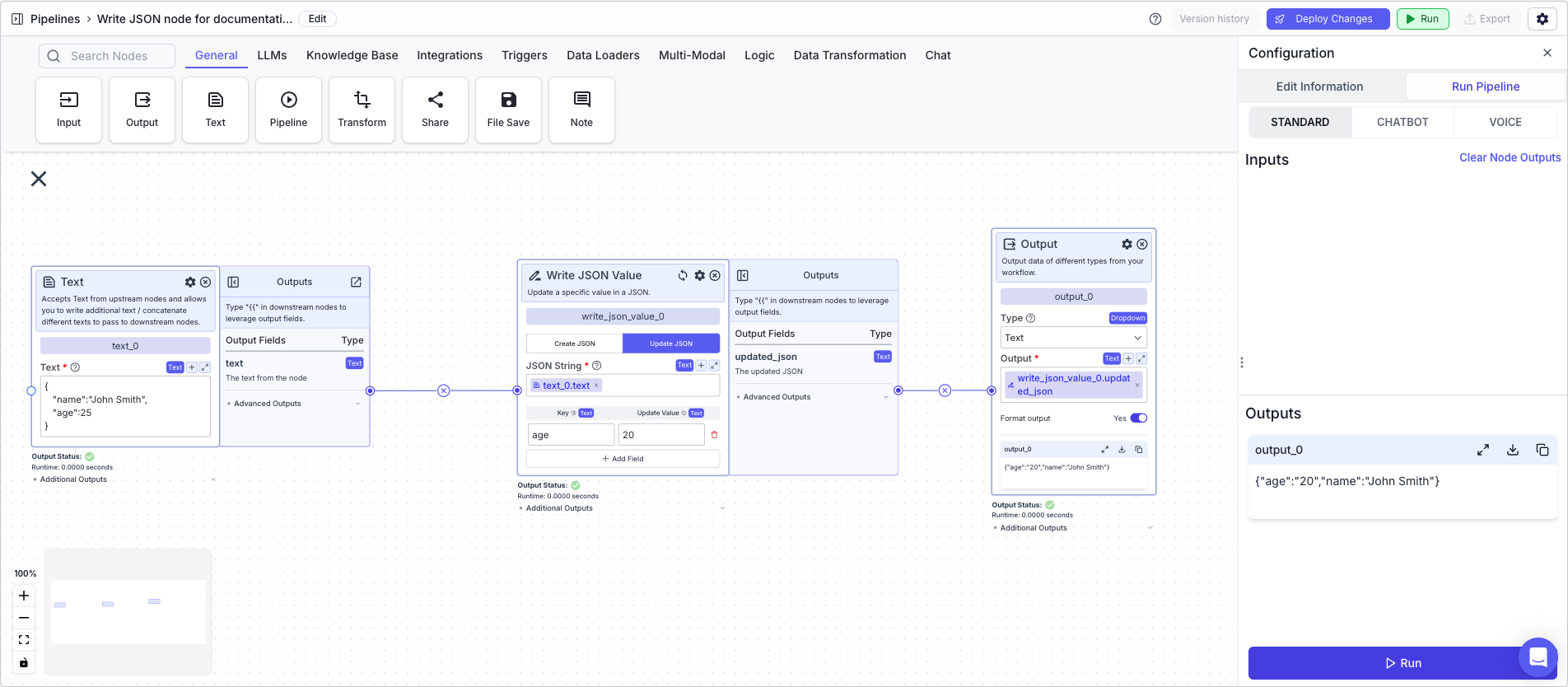
The below example shows a pipeline that takes in a JSON string and updates the value of the key "age" to "20".
1. Text Node: Contains the JSON string `{"name": "John Smith", "age": "25"}`
2. Write JSON Value Node: Updates the value of the key "age" to "20"
* JSON string: `{{text_0.text}}`
* Key: `age`
* Value: `20`
3. Output: display the updated JSON
* Output: `{{write_json_value_0.updated_json}}`
This node allows you to add or update a specific value in a JSON string.
## Node Inputs
If "Create JSON" is selected:
1. Key: The key of json. Note: Enclose in "" if your key contains special characters.
* Type: `Text`
2. Value: The value to be added to the JSON object.
* Type: `Text`
If "Update JSON" is selected:
1. JSON string: The JSON string you want to update
* Type: `Text`
2. Key: The key of json. Note: Enclose in "" if your key contains special characters.
* Type: `Text`
3. Value: The value to be added to the JSON object.
* Type: `Text`
## Node Parameters
Create JSON vs Update JSON toggle:
* Create JSON: This will create a new JSON string with the key value pairs provided.
* Update JSON: This will update the given JSON string with the key value pairs provided.
## Node Outputs
1. Updated JSON: The updated JSON string
* Type: `Text`
* Example usage: `{{write_json_value_0.updated_json}}`
## Example
The below example shows a pipeline that takes in a JSON string and updates the value of the key "age" to "20".
1. Text Node: Contains the JSON string `{"name": "John Smith", "age": "25"}`
2. Write JSON Value Node: Updates the value of the key "age" to "20"
* JSON string: `{{text_0.text}}`
* Key: `age`
* Value: `20`
3. Output: display the updated JSON
* Output: `{{write_json_value_0.updated_json}}`