> ## Documentation Index
> Fetch the complete documentation index at: https://docs.vectorshift.ai/llms.txt
> Use this file to discover all available pages before exploring further.
# CSV to Excel Node
> Convert a CSV file to an Excel file
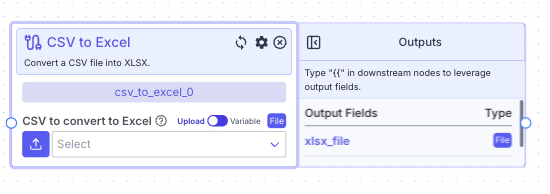 This node allows you to convert a csv file to XSLX.
## Node Inputs
1. CSV to convert to Excel: The name of the CSV file to be converted
* Type: `File`
For providing the file you have two options:
1. If toggle is on Upload: Upload a file by clicking the upload button
2. If toggle is on Variable: Reference files from other nodes.
## Node Outputs
1. XLSX File: The converted XLSX file
* Type: `File`
* Example usage: `{{csv_to_excel_0.xlsx_file}}`
## Example
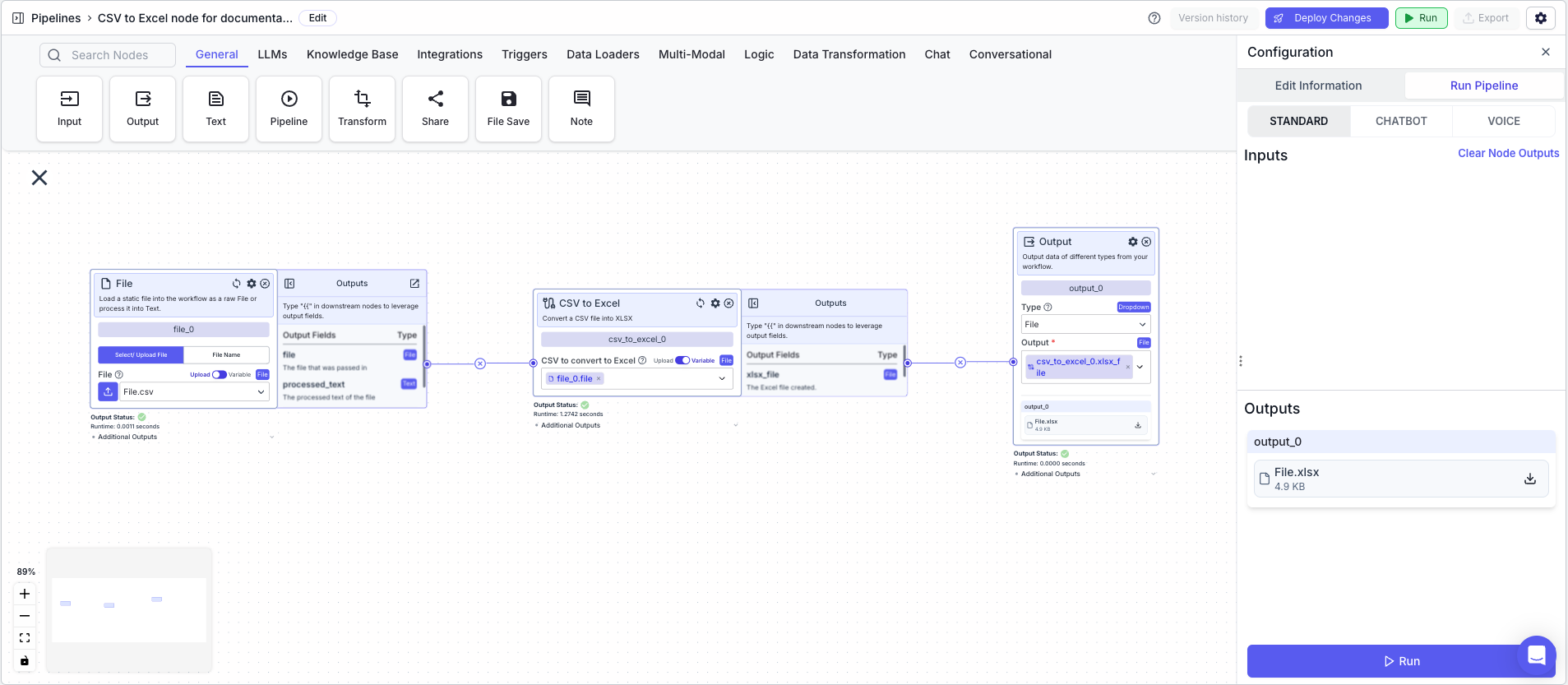
The below example shows a pipeline that converts a CSV file to an Excel file.
1. File Node: Loads the CSV file
* File: `File.csv` file created in the [CSV Writer Example](/platform/pipelines/data-transformation/file/csv-writer#example)
2. CSV to Excel Node: Converts the CSV file to an Excel file
* CSV to convert to Excel: `{{file_0.file}}`
3. Output Node: Displays the Excel file
* Output: `{{csv_to_excel_0.xlsx_file}}`
This node allows you to convert a csv file to XSLX.
## Node Inputs
1. CSV to convert to Excel: The name of the CSV file to be converted
* Type: `File`
For providing the file you have two options:
1. If toggle is on Upload: Upload a file by clicking the upload button
2. If toggle is on Variable: Reference files from other nodes.
## Node Outputs
1. XLSX File: The converted XLSX file
* Type: `File`
* Example usage: `{{csv_to_excel_0.xlsx_file}}`
## Example
The below example shows a pipeline that converts a CSV file to an Excel file.
1. File Node: Loads the CSV file
* File: `File.csv` file created in the [CSV Writer Example](/platform/pipelines/data-transformation/file/csv-writer#example)
2. CSV to Excel Node: Converts the CSV file to an Excel file
* CSV to convert to Excel: `{{file_0.file}}`
3. Output Node: Displays the Excel file
* Output: `{{csv_to_excel_0.xlsx_file}}`
 Outputted Excel File