> ## Documentation Index
> Fetch the complete documentation index at: https://docs.vectorshift.ai/llms.txt
> Use this file to discover all available pages before exploring further.
# Scorer Node
> Score a text input based on a set of criteria
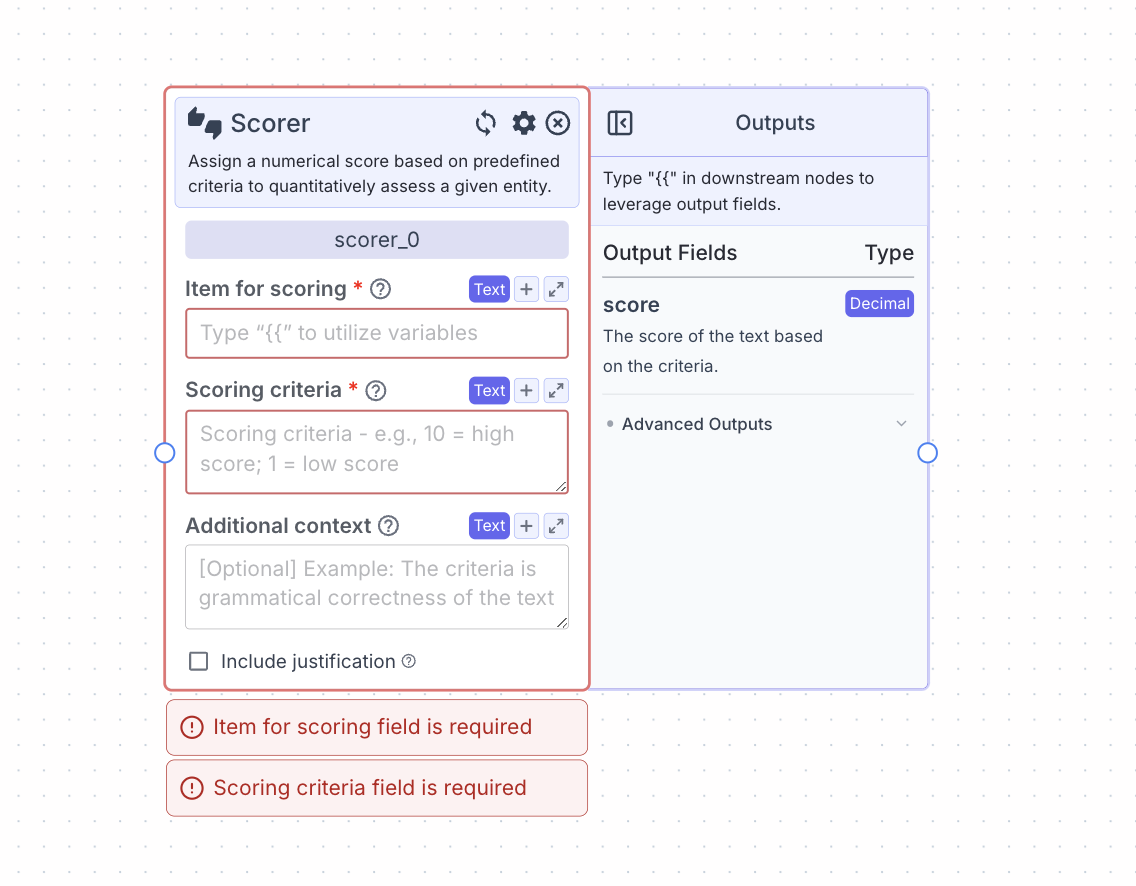 This node assigns scores to an item based on custom criteria.
You need to define the criteria in the scoring criteria field.
## Node Inputs
1. Item for Scoring: The text to be scored
* Type: `Text`
2. Scoring Criteria: The criteria which the text will be scored
* Type: `Text`
3. Additional Context: The additional information or instructions for the AI when doing the scoring
* Type: `Text`
## Node Parameters
On the face of the node:
1. Include Justification: When this parameter is turned on, the justification output field for why the score was given will be available.
In the gear:
1. Provider: Provider of the AI model you want to use. The default provider is OpenAI.
2. Model: Model name of the AI model you want to use. The default model is gpt-4o.
## Node Outputs
1. Score: The score of the text based on the criteria
* Type: `Text`
* Example usage: `{{scorer_0.score}}`
2. Justification: The justification given by the AI for selecting the score (if include justification is switched on)
* Type: `Text`
* Example usage: `{{scorer_0.justification}}`
## Considerations
* Define the bounds of the score in the scoring criteria, specifically the upwards and lower bounds. Define what criteria warrants a high vs low score.
## Example
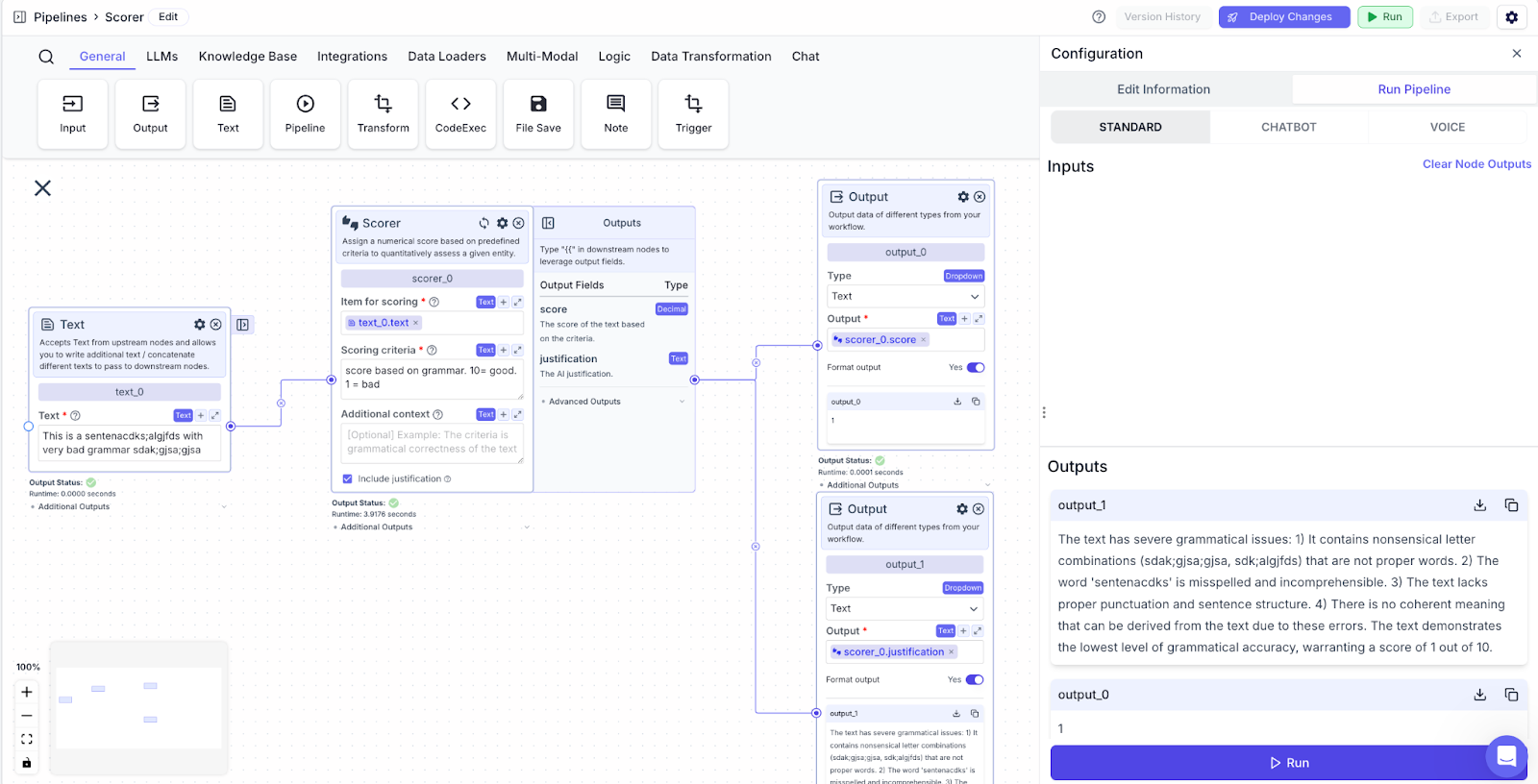
The below example is a pipeline that grades text based on grammar. The scoring criteria stipulates that a score of 1 means the text has bad grammar and a score of 10 means good grammar.
* Text Node: Text for grading.
* Scorer Node: Provide the text and specify the criteria for scoring.
* Item for scoring: `{{text_0.text}}`
* Output Node: Display the score from the Scorer Node.
* Output: `{{scorer_0.score}}`
This node assigns scores to an item based on custom criteria.
You need to define the criteria in the scoring criteria field.
## Node Inputs
1. Item for Scoring: The text to be scored
* Type: `Text`
2. Scoring Criteria: The criteria which the text will be scored
* Type: `Text`
3. Additional Context: The additional information or instructions for the AI when doing the scoring
* Type: `Text`
## Node Parameters
On the face of the node:
1. Include Justification: When this parameter is turned on, the justification output field for why the score was given will be available.
In the gear:
1. Provider: Provider of the AI model you want to use. The default provider is OpenAI.
2. Model: Model name of the AI model you want to use. The default model is gpt-4o.
## Node Outputs
1. Score: The score of the text based on the criteria
* Type: `Text`
* Example usage: `{{scorer_0.score}}`
2. Justification: The justification given by the AI for selecting the score (if include justification is switched on)
* Type: `Text`
* Example usage: `{{scorer_0.justification}}`
## Considerations
* Define the bounds of the score in the scoring criteria, specifically the upwards and lower bounds. Define what criteria warrants a high vs low score.
## Example
The below example is a pipeline that grades text based on grammar. The scoring criteria stipulates that a score of 1 means the text has bad grammar and a score of 10 means good grammar.
* Text Node: Text for grading.
* Scorer Node: Provide the text and specify the criteria for scoring.
* Item for scoring: `{{text_0.text}}`
* Output Node: Display the score from the Scorer Node.
* Output: `{{scorer_0.score}}`