> ## Documentation Index
> Fetch the complete documentation index at: https://docs.vectorshift.ai/llms.txt
> Use this file to discover all available pages before exploring further.
# Scrape URL Node
> Scrape content from a provided URL
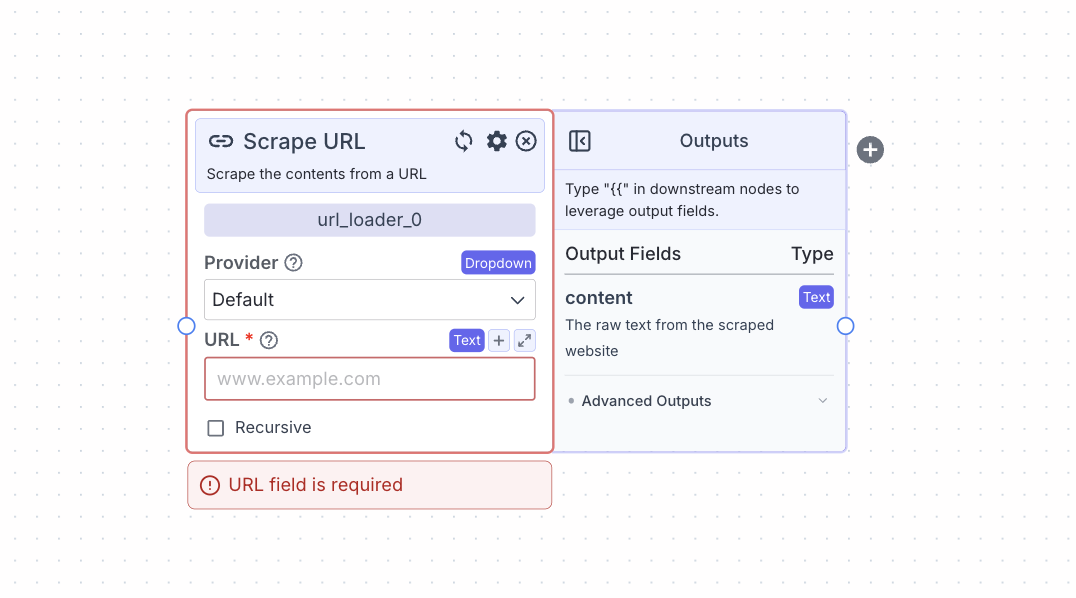 The scrape URL node allows you to scrape content from a provided URL.
## Node Inputs
1. URL: The URL of the webpage you want scraped
* Type: `Text`
## Node Parameters
On the face of the node:
1. Provider: The provider you want to use for scraping. The available providers are: Default (Combination of multiple providers), Jina and Apify.
2. Recursive: This will enable the recursive scraping of URLs that have the same base URL. For example, [https://vectorshift.ai/](https://vectorshift.ai/) and [https://vectorshift.ai/enterprise](https://vectorshift.ai/enterprise) all have the same based URL of [https://vectorshift.ai/](https://vectorshift.ai/).
3. URL Limit (if Recursive is set to true): The maximum limit for number URLs to scrape in recursion.
In the gear:
1. Use Personal Api Key: This allows you to enter an API key (note APIFY requires API key).
2. AI Enhance Content: Content from the website will be passed to an LLM to clean it up.
## Node Outputs
1. Content: The raw text from the website
* Type: `Text`
* Example usage: `{{url_loader_0.content}}`
## Considerations
* Click on the “+” button on the right of the node to create and connect the node to a [semantic search node](/platform/pipelines/knowledge/semantic-search) to enable semantic search on the content.
* Do not share your API key with someone that you do not trust.
## Example
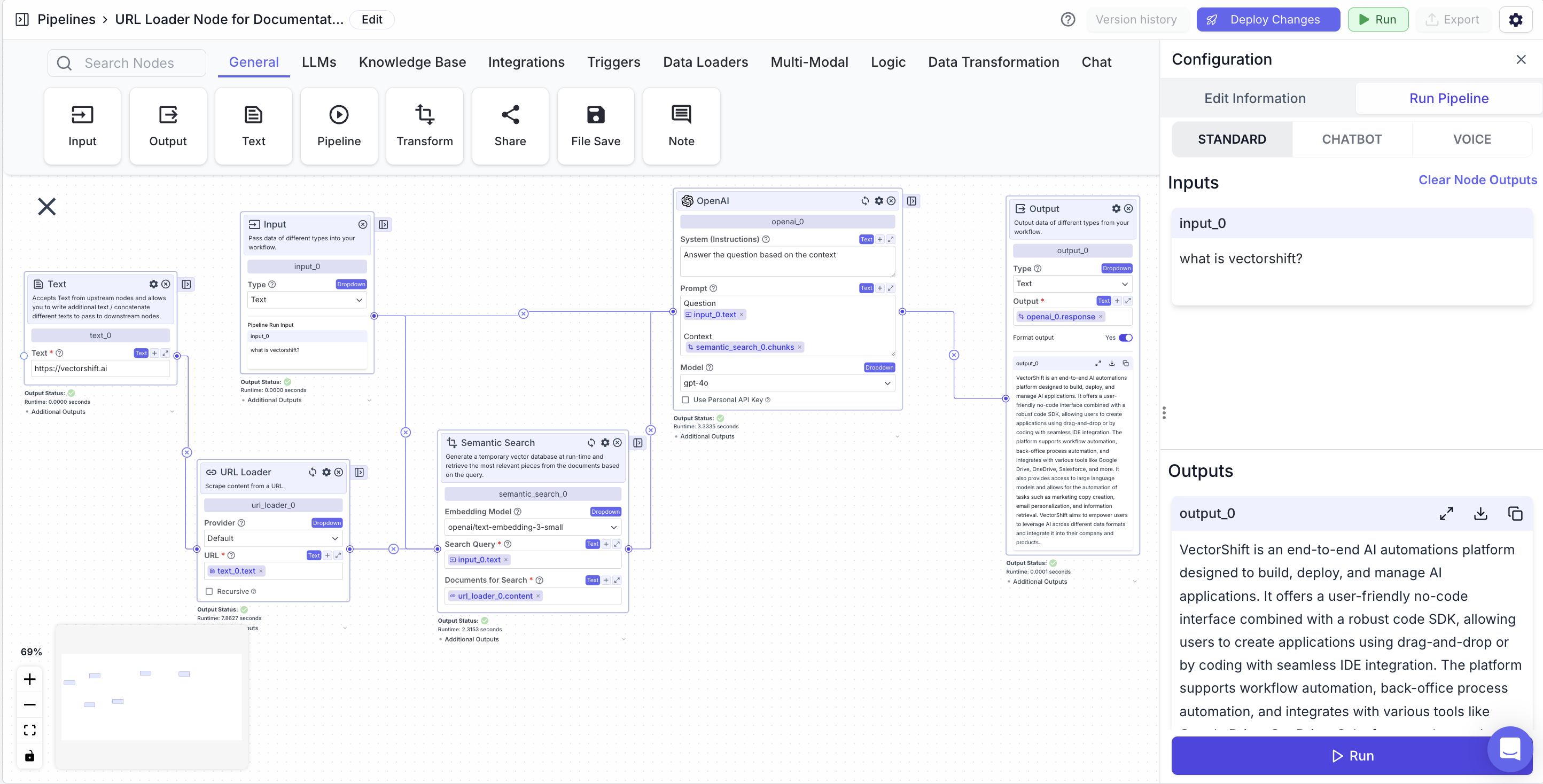
The below example is a pipeline which answers questions about on the contents of a website (example is with VectorShift's website).
* Input Node: The query about the website.
* Text Node: The URL for the website.
* Scrape URL node: Scrape the website URL
* URL: `{{text_0.text}}`
* Semantic Search Node: Find semantically similar chunks to a question (input node) based on a website (Scrape URL node).
* Search Query: `{{input_0.text}}`
* Documents for Search: `{{url_loader_0.content}}`
* LLM Node: Answer a user query (input node) based on relevant information (semantic search node).
* Prompt: `{{input_0.text}} and {{semantic_search_0.chunks}}`
* Output Node: Display the LLM's response.
* Output: `{{openai_0.response}}`
The scrape URL node allows you to scrape content from a provided URL.
## Node Inputs
1. URL: The URL of the webpage you want scraped
* Type: `Text`
## Node Parameters
On the face of the node:
1. Provider: The provider you want to use for scraping. The available providers are: Default (Combination of multiple providers), Jina and Apify.
2. Recursive: This will enable the recursive scraping of URLs that have the same base URL. For example, [https://vectorshift.ai/](https://vectorshift.ai/) and [https://vectorshift.ai/enterprise](https://vectorshift.ai/enterprise) all have the same based URL of [https://vectorshift.ai/](https://vectorshift.ai/).
3. URL Limit (if Recursive is set to true): The maximum limit for number URLs to scrape in recursion.
In the gear:
1. Use Personal Api Key: This allows you to enter an API key (note APIFY requires API key).
2. AI Enhance Content: Content from the website will be passed to an LLM to clean it up.
## Node Outputs
1. Content: The raw text from the website
* Type: `Text`
* Example usage: `{{url_loader_0.content}}`
## Considerations
* Click on the “+” button on the right of the node to create and connect the node to a [semantic search node](/platform/pipelines/knowledge/semantic-search) to enable semantic search on the content.
* Do not share your API key with someone that you do not trust.
## Example
The below example is a pipeline which answers questions about on the contents of a website (example is with VectorShift's website).
* Input Node: The query about the website.
* Text Node: The URL for the website.
* Scrape URL node: Scrape the website URL
* URL: `{{text_0.text}}`
* Semantic Search Node: Find semantically similar chunks to a question (input node) based on a website (Scrape URL node).
* Search Query: `{{input_0.text}}`
* Documents for Search: `{{url_loader_0.content}}`
* LLM Node: Answer a user query (input node) based on relevant information (semantic search node).
* Prompt: `{{input_0.text}} and {{semantic_search_0.chunks}}`
* Output Node: Display the LLM's response.
* Output: `{{openai_0.response}}`