> ## Documentation Index
> Fetch the complete documentation index at: https://docs.vectorshift.ai/llms.txt
> Use this file to discover all available pages before exploring further.
# RSS Feed Reader Node
> Read data from an RSS feed
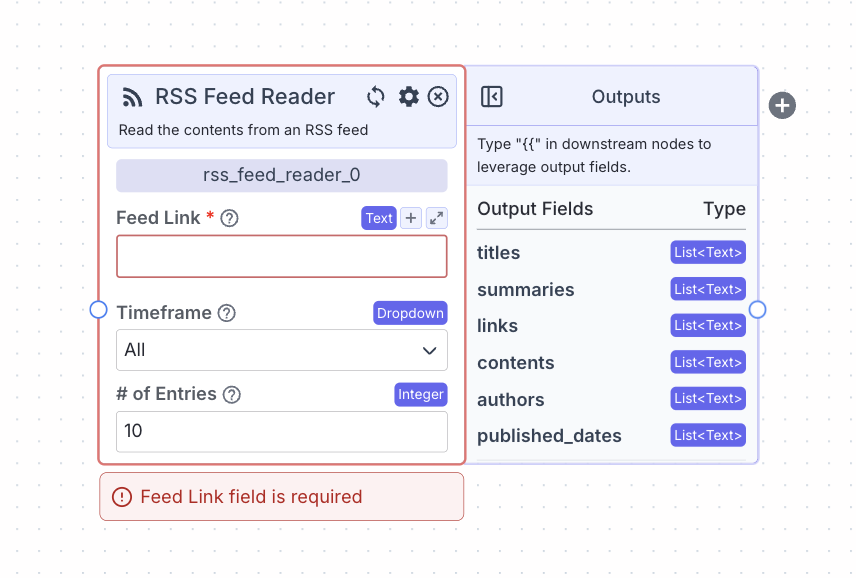 This node reads data from an RSS feed.
## Node Inputs
1. Feed Link: The link of the RSS feed
* Type: `Text`
2. Number of Entries: The maximum number of entries to fetch
* Type: `Integer`
## Node Parameters
1. Timeframe: The timeframe of publish dates of alerts to read. The available options are: All, Past Day, Past Week, Past Month
## Node Outputs
1. Titles: A list of the titles from the feed
* Type: `List`
* Example usage: `{{rss_feed_reader_0.titles}}`
2. Summaries: A list of summaries of the feed
* Type: `List`
* Example usage: `{{rss_feed_reader_0.snippets}}`
3. Links: A list of the links of the sites from the feed
* Type: `List`
* Example usage: `{{rss_feed_reader_0.links}}`
4. Contents: A list of the content from the feed
* Type: `List`
* Example usage: `{{rss_feed_reader_0.contents}}`
5. Authors: A list of the authors from the feed
* Type: `List`
* Example usage: `{{rss_feed_reader_0.authors}}`
6. Published Dates: A list of the publish dates from the feed
* Type: `List`
* Example usage: `{{rss_feed_reader_0.published_dates}}`
## Considerations
* Click on the “+” button on the right of the node to create and connect the node to a [semantic search node](/platform/pipelines/knowledge/semantic-search) to enable semantic search on the feed.
## Example
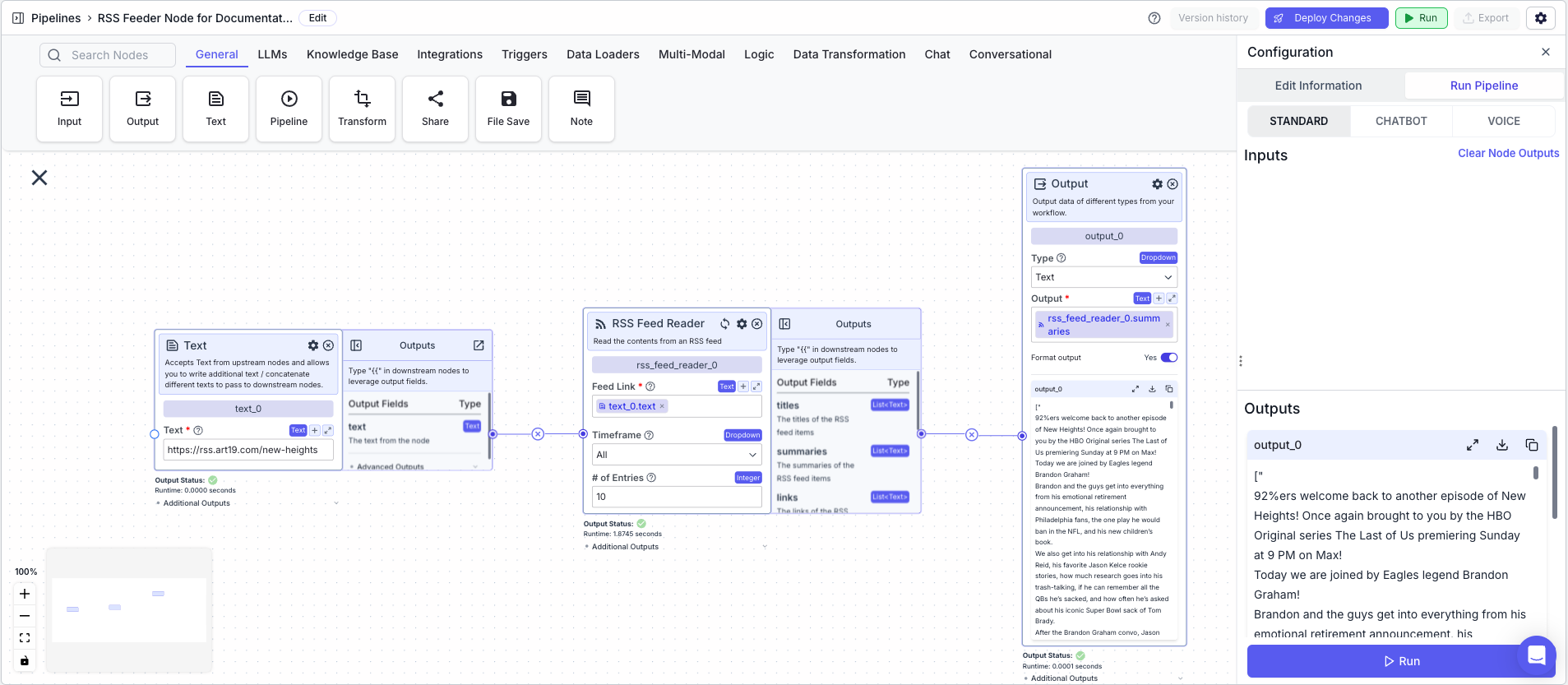
The below example shows a pipeline that returns the summaries from a RSS feed based on a RSS feed link.
1. Text Node: Contains the RSS feed link
2. RSS Feed Reader Node: Returns the summaries from the RSS feed based on a RSS feed link
* Feed Link: `{{text_0.text}}`
* Number of Entries: `10`
* Timeframe: `All`
3. Output Node: Displays the summaries
* Output: `{{rss_feed_reader_0.summaries}}`
This node reads data from an RSS feed.
## Node Inputs
1. Feed Link: The link of the RSS feed
* Type: `Text`
2. Number of Entries: The maximum number of entries to fetch
* Type: `Integer`
## Node Parameters
1. Timeframe: The timeframe of publish dates of alerts to read. The available options are: All, Past Day, Past Week, Past Month
## Node Outputs
1. Titles: A list of the titles from the feed
* Type: `List`
* Example usage: `{{rss_feed_reader_0.titles}}`
2. Summaries: A list of summaries of the feed
* Type: `List`
* Example usage: `{{rss_feed_reader_0.snippets}}`
3. Links: A list of the links of the sites from the feed
* Type: `List`
* Example usage: `{{rss_feed_reader_0.links}}`
4. Contents: A list of the content from the feed
* Type: `List`
* Example usage: `{{rss_feed_reader_0.contents}}`
5. Authors: A list of the authors from the feed
* Type: `List`
* Example usage: `{{rss_feed_reader_0.authors}}`
6. Published Dates: A list of the publish dates from the feed
* Type: `List`
* Example usage: `{{rss_feed_reader_0.published_dates}}`
## Considerations
* Click on the “+” button on the right of the node to create and connect the node to a [semantic search node](/platform/pipelines/knowledge/semantic-search) to enable semantic search on the feed.
## Example
The below example shows a pipeline that returns the summaries from a RSS feed based on a RSS feed link.
1. Text Node: Contains the RSS feed link
2. RSS Feed Reader Node: Returns the summaries from the RSS feed based on a RSS feed link
* Feed Link: `{{text_0.text}}`
* Number of Entries: `10`
* Timeframe: `All`
3. Output Node: Displays the summaries
* Output: `{{rss_feed_reader_0.summaries}}`