> ## Documentation Index
> Fetch the complete documentation index at: https://docs.vectorshift.ai/llms.txt
> Use this file to discover all available pages before exploring further.
# Accessing the API
> Add knowledge base search to your own apps, backends, or automations with ready-to-use code snippets
Build search into your own products. The API panel gives you ready-to-use code snippets so you can integrate knowledge base search into any application, backend, or automation — in minutes.
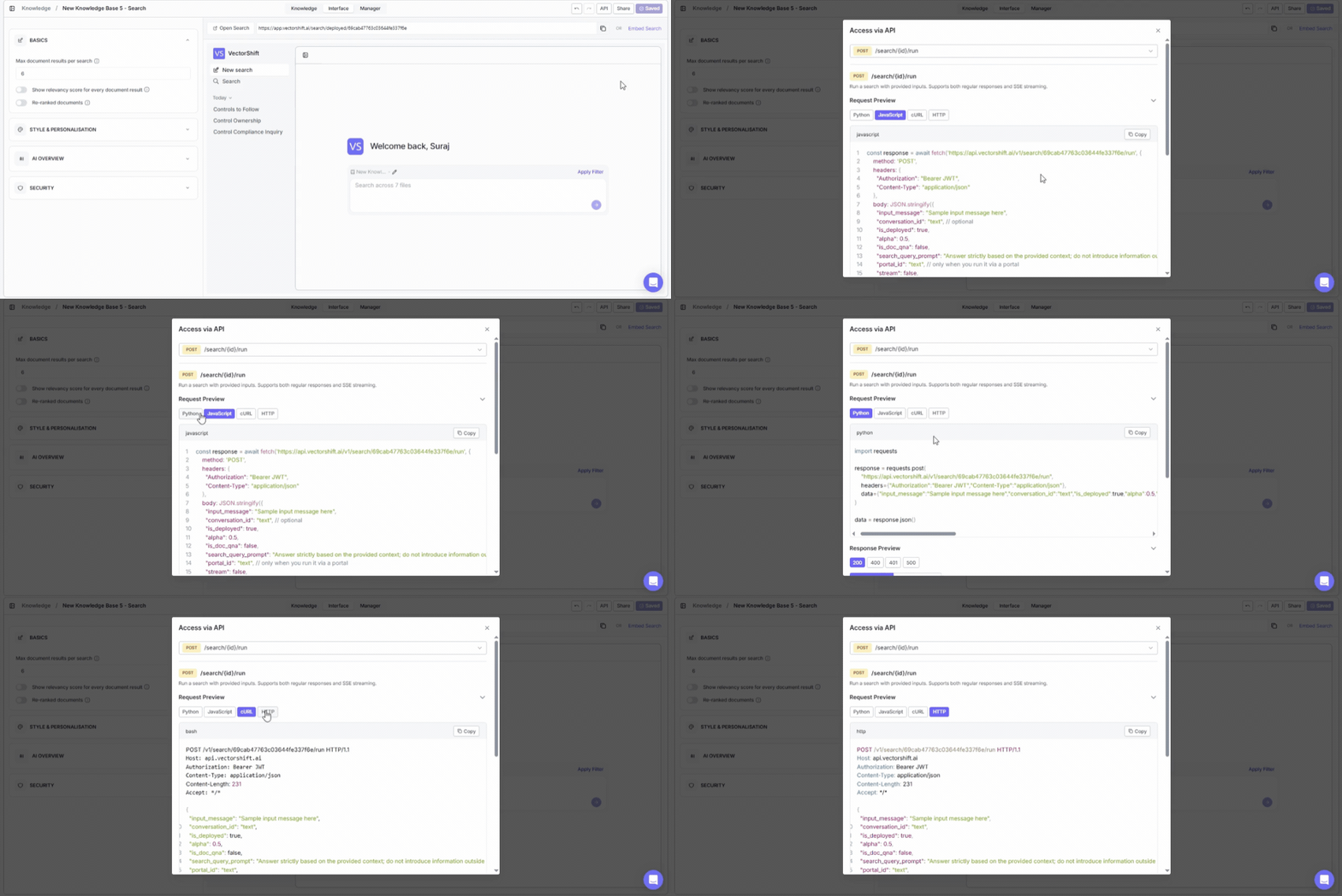
To open it, click the **API** button in the top-right area of the knowledge base detail page (on the Interface tab).
 You need to save your search interface before accessing API features. If you see a "Save your search" banner at the top of the dialog, click Save on the Interface tab first.
## Endpoint
The API exposes one endpoint:
**POST /search/\{id}/run**
This runs a search with your provided inputs. It supports both regular responses and SSE (Server-Sent Events) streaming.
## Request preview
The dialog provides a code snippet showing exactly how to call the endpoint. View the snippet in four languages by clicking the tabs:
* **Python**
* **JavaScript**
* **cURL**
* **HTTP**
Click **Copy** to copy the snippet to your clipboard.
## Key parameters
| Parameter | What it does |
| ---------------- | ----------------------------------------------------------------------------------------------------------------------- |
| input\_message | The search query text (e.g., "Sample input message here") |
| conversation\_id | An optional identifier for maintaining conversation context across multiple queries (e.g., "text") |
| is\_deployed | Set to true to use the deployed search configuration |
| alpha | A numeric value (e.g., 0.5) that controls the balance between semantic and keyword search when hybrid search is enabled |
## Authentication
All API requests require a Bearer JWT token in the Authorization header. The code snippet includes a placeholder showing where to insert your token.
## Full API reference
Create, fetch, list, query, index, and delete knowledge bases and documents.
You need to save your search interface before accessing API features. If you see a "Save your search" banner at the top of the dialog, click Save on the Interface tab first.
## Endpoint
The API exposes one endpoint:
**POST /search/\{id}/run**
This runs a search with your provided inputs. It supports both regular responses and SSE (Server-Sent Events) streaming.
## Request preview
The dialog provides a code snippet showing exactly how to call the endpoint. View the snippet in four languages by clicking the tabs:
* **Python**
* **JavaScript**
* **cURL**
* **HTTP**
Click **Copy** to copy the snippet to your clipboard.
## Key parameters
| Parameter | What it does |
| ---------------- | ----------------------------------------------------------------------------------------------------------------------- |
| input\_message | The search query text (e.g., "Sample input message here") |
| conversation\_id | An optional identifier for maintaining conversation context across multiple queries (e.g., "text") |
| is\_deployed | Set to true to use the deployed search configuration |
| alpha | A numeric value (e.g., 0.5) that controls the balance between semantic and keyword search when hybrid search is enabled |
## Authentication
All API requests require a Bearer JWT token in the Authorization header. The code snippet includes a placeholder showing where to insert your token.
## Full API reference
Create, fetch, list, query, index, and delete knowledge bases and documents.